Tired of bending your workflow to one-size-fits-all tools? Let’s make something new and exciting. Introducing, the newest EPG: Editorial Plan Prompt Generator.

In this tutorial you’ll build a tiny Chrome extension that turns a list of keywords into a clean, constraint-based prompt for ChatGPT. It’s perfect for writers, bloggers, designers, and developers who want a tool that behaves exactly the way they work—without monthly fees and without sending data to third-party servers.
This is intentionally a work in progress. You’ll get a solid, production-ready base that you can extend with new features as your needs evolve.
Table of Contents
What you’ll build
-
A compact popup UI plus a persistent full-page editor (great for importing files).
-
A Keywords field that accepts one keyword per line (also supports commas/semicolons).
-
Import from
.txtor.csv(replace or merge with existing keywords). -
Automatic cleaning on paste: trims whitespace, removes blanks, deduplicates, keeps ordering sane.
-
Live keyword counter and a guidance notice (e.g., “capped to N” or “increased to N”).
-
One-to-one mapping: if you provide multiple keywords, the tool enforces “one keyword = one article idea.”
-
Selectable Language, Tone, Style, FAQs yes/no, word count, and an extra notes field.
-
Generates a structured prompt per idea: SEO title (≤60 chars), SEO description (≤160), image alt tag, brief outline.
-
Copy to clipboard, Reset, and local persistence (localStorage).
-
Local-only, privacy-first: no telemetry, no network calls, no external libraries.
Why local-first matters
Everything happens in your browser. If your editorial work includes trade secrets, NDA-bound material, private research, or just competitive keyword sets, you don’t want them leaving your device. This extension stores only your last inputs in localStorage for convenience—nothing goes to third-party servers.
Prerequisites
-
Google Chrome (or any Chromium browser with Manifest V3 support).
-
No build tools or external packages—just a few static files.
Project structure
Create a folder (for example, editorial-plan-prompt-generator/) and add these files:
editorial-plan-prompt-generator/
├─ manifest.json
├─ popup.html
├─ popup.css
├─ popup.js
├─ app.html ← full-page editor (persistent tab)
└─ icons/
├─ icon16.png
├─ icon32.png
├─ icon48.png
└─ icon128.png
Use these exact filenames inside your project folder.
1) manifest.json
What it does: Declares a Manifest V3 extension with a popup and app icons. No permissions are required (privacy-first, local-only).
{
 "manifest_version": 3,
 "name": "Editorial Plan Prompt Generator",
 "version": "1.0.0",
 "description": "Builds a structured ChatGPT prompt for generating an editorial plan based on your inputs.",
 "action": {
 "default_popup": "popup.html",
 "default_title": "Editorial Plan Prompt Generator"
 },
 "icons": {
 "16": "icons/icon16.png",
 "32": "icons/icon32.png",
 "48": "icons/icon48.png",
 "128": "icons/icon128.png"
 },
 "permissions": []
}
2) popup.html
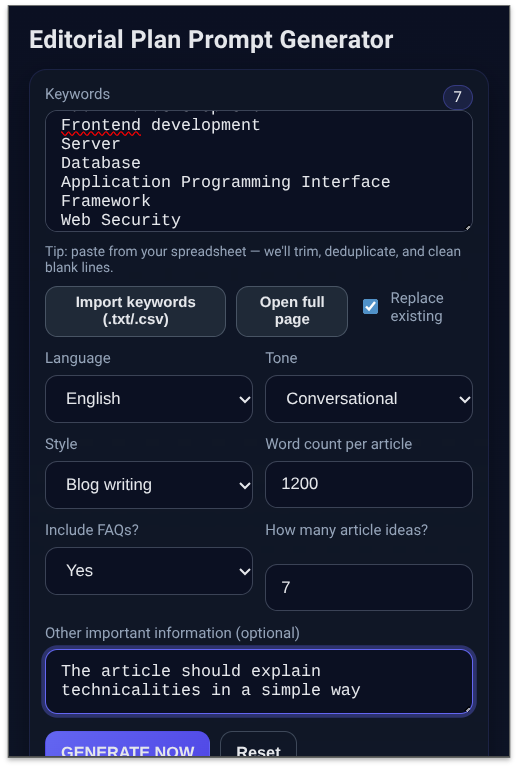
What it does: The main UI shown when you click the extension icon. Includes a Keywords textarea, import button, replace/merge toggle, select fields, notice area, buttons, and a read-only output box.
 <!doctype html>
<html lang="en">
<head>
 <meta charset="utf-8">
 <meta name="viewport" content="width=device-width,initial-scale=1">
 <title>Editorial Plan Prompt Generator</title>
 <link rel="stylesheet" href="popup.css">
</head>
<body>
 <main class="container">
 <h1 class="app-title">Editorial Plan Prompt Generator</h1>
 <form id="promptForm" autocomplete="off" novalidate>
 <div class="field">
 <div class="label-row">
 <label for="keywords">Keywords</label>
 <span class="chip" id="kwCount">0</span>
 </div>
 <textarea id="keywords" name="keywords" rows="5"
 placeholder="One keyword per line (or comma-separated).
Example:
electric bike
city commute
battery life"></textarea>
 <small class="hint">Paste from a spreadsheet — we’ll trim, deduplicate, and remove blank lines.</small>
 <div class="import-row">
 <input type="file" id="fileInput" accept=".txt,.csv" hidden>
 <button type="button" class="btn small" id="importBtn">Import keywords (.txt/.csv)</button>
 <button type="button" class="btn small" id="openFullBtn">Open full page</button>
 <label class="inline">
 <input type="checkbox" id="replaceToggle" checked>
 Replace existing
 </label>
 </div>
 </div>
 <div class="row">
 <div class="field half">
 <label for="language">Language</label>
 <select id="language" name="language" required>
 <option>English</option><option>Spanish</option><option>Portuguese</option><option>Italian</option>
 <option>German</option><option>French</option><option>Chinese (Simplified)</option><option>Chinese (Traditional)</option>
 <option>Japanese</option><option>Korean</option><option>Russian</option><option>Arabic</option><option>Hindi</option>
 <option>Thai</option><option>Indonesian</option><option>Turkish</option><option>Dutch</option><option>Polish</option><option>Swedish</option>
 </select>
 </div>
 <div class="field half">
 <label for="tone">Tone</label>
 <select id="tone" name="tone" required>
 <option>Professional</option><option>Enthusiastic</option><option>Neutral</option><option>Friendly</option>
 <option>Authoritative</option><option>Conversational</option><option>Inspirational</option><option>Technical</option>
 <option>Journalistic</option><option>Humorous</option>
 </select>
 </div>
 </div>
 <div class="row">
 <div class="field half">
 <label for="style">Style</label>
 <select id="style" name="style" required>
 <option>Blog writing</option><option>How-to guide</option><option>Listicle</option><option>Case study</option><option>White paper</option>
 <option>News article</option><option>Product review</option><option>Interview style</option><option>Q&A</option><option>Storytelling</option>
 </select>
 </div>
 <div class="field half">
 <label for="wordCount">Word count per article</label>
 <input id="wordCount" name="wordCount" type="number" min="300" step="50" value="1200" required>
 </div>
 </div>
 <div class="row">
 <div class="field half">
 <label for="faqs">Include FAQs?</label>
 <select id="faqs" name="faqs" required>
 <option value="Yes">Yes</option>
 <option value="No" selected>No</option>
 </select>
 </div>
 <div class="field half">
 <label for="articlesCount">How many article ideas?</label>
 <div id="articleNotice" class="notice"></div>
 <input id="articlesCount" name="articlesCount" type="number" min="1" max="50" step="1" value="12" required>
 </div>
 </div>
 <div class="field">
 <label for="extra">Other important information (optional)</label>
 <textarea id="extra" name="extra" rows="2"
 placeholder="Deadlines, target audience, mandatory sections, brand voice guidelines, etc."></textarea>
 </div>
 <div class="actions">
 <button type="submit" class="btn primary">GENERATE NOW</button>
 <button type="reset" class="btn ghost" id="resetBtn">Reset</button>
 <button type="button" class="btn" id="copyBtn" disabled>Copy final prompt</button>
 </div>
 </form>
 <section class="output">
 <h2 class="section-title">Your ChatGPT Prompt</h2>
 <textarea id="result" rows="14" readonly
 placeholder="Your generated prompt will appear here..."></textarea>
 </section>
 <footer class="footnote">
 <p>Runs locally in your browser. No data is sent anywhere.</p>
 </footer>
 </main>
 <script src="popup.js" defer></script>
</body>
</html>
3) popup.css
What it does: Simple, modern dark theme; compact and readable in the popup and in the full-page view.
 :root{
 --bg:#0f172a; --panel:#111827; --muted:#94a3b8; --text:#e5e7eb;
 --accent:#6366f1; --accent-strong:#4f46e5; --ring:rgba(99,102,241,.35);
 --ok:#16a34a; --ghost:#1f2937;
}
*{box-sizing:border-box}
html,body{
 margin:0;padding:0;
 font-family:ui-sans-serif,system-ui,-apple-system,Segoe UI,Roboto,Helvetica,Arial;
 background:linear-gradient(180deg,#0b1022,#0f172a);
 color:var(--text);
}
.container{width:400px;padding:16px 16px 12px}
.app-title{font-size:20px;margin:0 0 10px}
form{
 background:rgba(17,24,39,.65);
 border:1px solid rgba(99,102,241,.15);
 border-radius:14px;padding:12px;
 backdrop-filter:blur(6px);
 box-shadow:0 10px 25px rgba(0,0,0,.35);
}
.field{margin-bottom:10px}
.label-row{display:flex;align-items:center;justify-content:space-between}
.chip{
 display:inline-block;background:rgba(99,102,241,.15);
 border:1px solid rgba(99,102,241,.35);
 padding:2px 8px;border-radius:999px;font-size:12px;
}
label{display:block;font-size:12px;color:var(--muted);margin-bottom:6px}
input[type="number"],select,textarea{
 width:100%;padding:10px 12px;border:1px solid rgba(148,163,184,.35);
 background:#0b1022;color:var(--text);border-radius:10px;outline:none;
 transition:box-shadow .2s,border-color .2s;
}
textarea{resize:vertical}
input:focus,select:focus,textarea:focus{
 border-color:var(--accent);box-shadow:0 0 0 3px var(--ring);
}
.hint,.notice{display:block;margin-top:6px;font-size:11px;color:var(--muted);min-height:14px}
.row{display:grid;grid-template-columns:1fr 1fr;gap:10px}
.half{width:100%}
.import-row{display:flex;align-items:center;gap:8px;margin-top:8px}
.inline{display:flex;align-items:center;gap:6px;font-size:12px;color:var(--muted)}
.actions{display:flex;gap:8px;margin-top:8px;flex-wrap:wrap}
.btn{
 border:1px solid rgba(148,163,184,.35);
 background:var(--ghost);color:var(--text);
 padding:10px 12px;border-radius:10px;font-weight:600;font-size:13px;cursor:pointer;
}
.btn.small{padding:6px 10px;font-size:12px}
.btn.primary{background:linear-gradient(135deg,var(--accent),var(--accent-strong));border-color:transparent}
.btn:disabled{opacity:.6;cursor:not-allowed}
.output{
 margin-top:12px;background:rgba(17,24,39,.65);
 border:1px solid rgba(99,102,241,.15);border-radius:14px;padding:12px;
}
.section-title{margin:0 0 8px 0;font-size:14px;color:var(--muted)}
#result{
 width:100%;min-height:180px;
 font-family:ui-monospace,Consolas,Menlo,monospace;
 font-size:12px;line-height:1.4;border-radius:10px;background:#0b1022;color:#d1d5db;
 border:1px solid rgba(148,163,184,.35);
}
.footnote{text-align:center;font-size:11px;color:var(--muted);margin-top:8px}
4) popup.js
What it does: All the behavior. Highlights include multi-format keyword parsing, live counter, import with replace/merge, paste sanitizer, live notice, gentle auto-adjust, strict 1:1 mapping when multiple keywords are present, copy/reset, and opening the full-page editor.
 'use strict';
/* ===== Constants (used for validation defaults if needed) ===== */
const LANGS = [
 "English","Spanish","Portuguese","Italian","German","French",
 "Chinese (Simplified)","Chinese (Traditional)","Japanese","Korean","Russian",
 "Arabic","Hindi","Thai","Indonesian","Turkish","Dutch","Polish","Swedish"
];
const TONES = [
 "Professional","Enthusiastic","Neutral","Friendly","Authoritative",
 "Conversational","Inspirational","Technical","Journalistic","Humorous"
];
const STYLES = [
 "Blog writing","How-to guide","Listicle","Case study","White paper",
 "News article","Product review","Interview style","Q&A","Storytelling"
];
const $ = (sel) => document.querySelector(sel);
/* ===== Utilities ===== */
function normalizeKeywords(raw) {
 if (!raw) return [];
 return Array.from(new Set(
 raw.split(/\r?\n|,|;/g).map(s => s.trim()).filter(Boolean)
 ));
}
function persistForm() {
 const form = $('#promptForm');
 if (!form) return;
 const data = Object.fromEntries(new FormData(form).entries());
 try { localStorage.setItem('epg.form', JSON.stringify(data)); } catch {}
}
function restoreForm() {
 try {
 const raw = localStorage.getItem('epg.form');
 if (!raw) return;
 const data = JSON.parse(raw);
 for (const [k, v] of Object.entries(data)) {
 const el = document.querySelector(`[name="${k}"]`);
 if (el) el.value = v;
 }
 } catch {}
}
function updateKwCount() {
 const n = normalizeKeywords($('#keywords')?.value || "").length;
 const chip = $('#kwCount');
 if (chip) chip.textContent = String(n);
}
function updateArticleCountNotice() {
 const kwList = normalizeKeywords($('#keywords')?.value || "");
 const requested = parseInt($('#articlesCount')?.value || "0", 10);
 const note = $('#articleNotice');
 if (!note) return;
 note.textContent = "";
 if (kwList.length > 1) {
 if (requested > kwList.length) {
 note.textContent = `Tip: You have ${kwList.length} unique keywords but requested ${requested}. The count will be capped to ${kwList.length}.`;
 } else if (requested < kwList.length && requested >= 1) {
 note.textContent = `Tip: You have ${kwList.length} unique keywords but requested ${requested}. The count will be increased to ${kwList.length}.`;
 }
 } else if (requested < 3) {
 note.textContent = `Tip: Minimum recommended is 3 article ideas.`;
 }
}
function gentleAutoAdjust() {
 const kwList = normalizeKeywords($('#keywords')?.value || "");
 const ac = $('#articlesCount');
 if (kwList.length > 1 && ac) {
 ac.value = String(kwList.length);
 }
 updateArticleCountNotice();
}
/* Import from file (.txt/.csv) */
async function importKeywordsFromFile() {
 const input = $('#fileInput');
 const replace = $('#replaceToggle')?.checked ?? true;
 if (!input) return;
 return new Promise((resolve) => {
 input.onchange = async (e) => {
 const file = e.target.files?.[0];
 if (!file) return resolve(false);
 try {
 const text = await file.text();
 const imported = normalizeKeywords(text);
 const current = normalizeKeywords($('#keywords')?.value || "");
 const merged = replace ? imported : Array.from(new Set([...current, ...imported]));
 const ta = $('#keywords');
 if (ta) ta.value = merged.join('\n');
 updateKwCount();
 gentleAutoAdjust();
 persistForm();
 } catch (e) {
 console.error('Import failed:', e);
 } finally {
 input.value = "";
 resolve(true);
 }
 };
 input.click();
 });
}
function buildPrompt(data) {
 const kwList = normalizeKeywords(data.keywords);
 const kwStr = kwList.join(', ');
 const mappingRule = kwList.length > 1
 ? `- For each suggested article, use exactly one unique keyword from the provided list (no repeats). Map articles 1:1 to keywords in order.`
 : null;
 return [
 `Act as a copywriter. Using the suggested keywords, create a complete editorial plan based on the following requirements:`,
 ``,
 `• Language: ${data.language}`,
 `• Tone: ${data.tone}`,
 `• Style: ${data.style}`,
 `• Include FAQs: ${data.faqs}`,
 `• Target word count per article: ${data.wordCount}`,
 `• Number of article ideas to propose: ${data.articlesCount}`,
 `• Keywords (comma separated): ${kwStr}`,
 data.extra ? `• Other important information: ${data.extra}` : null,
 ``,
 `For each suggested article, provide:`,
 `1) SEO title (max 60 characters)`,
 `2) SEO description (max 160 characters)`,
 `3) Image alt tag`,
 `4) Brief outline of the article (4–6 bullet points).`,
 ``,
 `Important notes:`,
 mappingRule,
 `- Make sure the keywords are naturally integrated.`,
 `- Avoid repetition across titles; ensure variety.`,
 `- Keep SEO title/description within the character limits.`,
 ``,
 `Return the full plan in ${data.language}.`
 ].filter(Boolean).join('\n');
}
/* ===== Init ===== */
function initUI() {
 const form = $('#promptForm');
 if (!form) { console.error('promptForm not found'); return; }
 // restore previous session
 restoreForm();
 // counters and notice
 updateKwCount();
 updateArticleCountNotice();
 // popup → open full page
 const openBtn = $('#openFullBtn');
 if (openBtn) {
 openBtn.addEventListener('click', () => {
 const url = chrome.runtime.getURL('app.html');
 window.open(url, '_blank');
 });
 }
 // import
 const importBtn = $('#importBtn');
 if (importBtn) {
 importBtn.addEventListener('click', importKeywordsFromFile);
 }
 // input persistence & live hints
 form.addEventListener('input', () => {
 updateKwCount();
 updateArticleCountNotice();
 persistForm();
 });
 // paste sanitizer and blur auto-adjust
 const kw = $('#keywords');
 if (kw) {
 kw.addEventListener('paste', () => {
 setTimeout(() => {
 const cleaned = normalizeKeywords(kw.value).join('\n');
 kw.value = cleaned;
 updateKwCount();
 gentleAutoAdjust();
 persistForm();
 }, 0);
 });
 kw.addEventListener('blur', gentleAutoAdjust);
 }
 const ac = $('#articlesCount');
 if (ac) ac.addEventListener('blur', gentleAutoAdjust);
 // submit
 form.addEventListener('submit', (e) => {
 e.preventDefault();
 const data = Object.fromEntries(new FormData(form).entries());
 const note = $('#articleNotice');
 if (note) note.textContent = "";
 const kw = (data.keywords || "").trim();
 const wc = parseInt(data.wordCount, 10);
 let n = parseInt(data.articlesCount, 10);
 const kwList = normalizeKeywords(data.keywords);
 if (!kw) {
 if (note) note.textContent = "Please enter at least one keyword.";
 $('#keywords')?.focus();
 return;
 }
 if (Number.isNaN(wc) || wc < 300) {
 if (note) note.textContent = "Please set a word count of at least 300.";
 $('#wordCount')?.focus();
 return;
 }
 if (kwList.length > 1) {
 n = kwList.length;
 const ac = $('#articlesCount'); if (ac) ac.value = String(n);
 data.articlesCount = String(n);
 } else if (Number.isNaN(n) || n < 1) {
 if (note) note.textContent = "Please request at least 1 article idea.";
 $('#articlesCount')?.focus();
 return;
 }
 const prompt = buildPrompt(data);
 const out = $('#result');
 if (out) {
 out.value = prompt;
 const copyBtn = $('#copyBtn');
 if (copyBtn) copyBtn.disabled = false;
 }
 });
 // reset
 const resetBtn = $('#resetBtn');
 if (resetBtn) {
 resetBtn.addEventListener('click', () => {
 const out = $('#result'); if (out) out.value = "";
 const copyBtn = $('#copyBtn'); if (copyBtn) copyBtn.disabled = true;
 try { localStorage.removeItem('epg.form'); } catch {}
 $('#language') && ($('#language').value = 'English');
 $('#tone') && ($('#tone').value = 'Professional');
 $('#style') && ($('#style').value = 'Blog writing');
 updateKwCount();
 const note = $('#articleNotice'); if (note) note.textContent = "";
 });
 }
 // copy
 const copyBtn = $('#copyBtn');
 if (copyBtn) {
 copyBtn.addEventListener('click', async () => {
 const txt = ($('#result')?.value || "").trim();
 if (!txt) return;
 try {
 await navigator.clipboard.writeText(txt);
 const prev = copyBtn.textContent;
 copyBtn.textContent = "Copied!";
 copyBtn.style.background = "linear-gradient(135deg, #16a34a, #0ea5e9)";
 setTimeout(() => {
 copyBtn.textContent = prev;
 copyBtn.style.background = "";
 }, 1200);
 } catch (err) {
 const out = $('#result');
 out?.select();
 document.execCommand('copy');
 alert('Copied to clipboard.');
 }
 });
 }
}
/* Boot */
if (document.readyState === 'loading') {
 document.addEventListener('DOMContentLoaded', initUI);
} else {
 initUI();
}
5) app.html
What it does: Opens the exact same UI as a normal tab (persistent), so the OS file picker won’t close your interface during imports.
 <!doctype html>
<html lang="en">
<head>
 <meta charset="utf-8">
 <meta name="viewport" content="width=device-width,initial-scale=1">
 <title>Editorial Plan Prompt Generator — Full Page</title>
 <link rel="stylesheet" href="popup.css">
 <style>
 .container { width: min(900px, 92vw); margin: 24px auto; }
 .app-title { display: flex; align-items: baseline; gap: 8px; }
 .tag { font-size: 11px; padding: 2px 8px; border-radius: 999px;
 border: 1px solid rgba(99,102,241,.35); color: #c7d2fe; }
 </style>
</head>
<body>
 <main class="container">
 <h1 class="app-title">Editorial Plan Prompt Generator <span class="tag">Full Page</span></h1>
 <form id="promptForm" autocomplete="off" novalidate>
 <div class="field">
 <div class="label-row">
 <label for="keywords">Keywords</label>
 <span class="chip" id="kwCount">0</span>
 </div>
 <textarea id="keywords" name="keywords" rows="8"
 placeholder="One keyword per line (or comma-separated).
Example:
electric bike
city commute
battery life"></textarea>
 <small class="hint">Paste from a spreadsheet — we’ll trim, deduplicate, and remove blank lines.</small>
 <div class="import-row">
 <input type="file" id="fileInput" accept=".txt,.csv" hidden>
 <button type="button" class="btn small" id="importBtn">Import keywords (.txt/.csv)</button>
 <label class="inline">
 <input type="checkbox" id="replaceToggle" checked>
 Replace existing
 </label>
 </div>
 </div>
 <div class="row">
 <div class="field half">
 <label for="language">Language</label>
 <select id="language" name="language" required>
 <option>English</option><option>Spanish</option><option>Portuguese</option><option>Italian</option>
 <option>German</option><option>French</option><option>Chinese (Simplified)</option><option>Chinese (Traditional)</option>
 <option>Japanese</option><option>Korean</option><option>Russian</option><option>Arabic</option><option>Hindi</option>
 <option>Thai</option><option>Indonesian</option><option>Turkish</option><option>Dutch</option><option>Polish</option><option>Swedish</option>
 </select>
 </div>
 <div class="field half">
 <label for="tone">Tone</label>
 <select id="tone" name="tone" required>
 <option>Professional</option><option>Enthusiastic</option><option>Neutral</option><option>Friendly</option>
 <option>Authoritative</option><option>Conversational</option><option>Inspirational</option><option>Technical</option>
 <option>Journalistic</option><option>Humorous</option>
 </select>
 </div>
 </div>
 <div class="row">
 <div class="field half">
 <label for="style">Style</label>
 <select id="style" name="style" required>
 <option>Blog writing</option><option>How-to guide</option><option>Listicle</option><option>Case study</option><option>White paper</option>
 <option>News article</option><option>Product review</option><option>Interview style</option><option>Q&A</option><option>Storytelling</option>
 </select>
 </div>
 <div class="field half">
 <label for="wordCount">Word count per article</label>
 <input id="wordCount" name="wordCount" type="number" min="300" step="50" value="1200" required>
 </div>
 </div>
 <div class="row">
 <div class="field half">
 <label for="faqs">Include FAQs?</label>
 <select id="faqs" name="faqs" required>
 <option value="Yes">Yes</option>
 <option value="No" selected>No</option>
 </select>
 </div>
 <div class="field half">
 <label for="articlesCount">How many article ideas?</label>
 <div id="articleNotice" class="notice"></div>
 <input id="articlesCount" name="articlesCount" type="number" min="1" max="50" step="1" value="12" required>
 </div>
 </div>
 <div class="field">
 <label for="extra">Other important information (optional)</label>
 <textarea id="extra" name="extra" rows="3"
 placeholder="Deadlines, target audience, mandatory sections, brand voice guidelines, etc."></textarea>
 </div>
 <div class="actions">
 <button type="submit" class="btn primary">GENERATE NOW</button>
 <button type="reset" class="btn ghost" id="resetBtn">Reset</button>
 <button type="button" class="btn" id="copyBtn" disabled>Copy final prompt</button>
 </div>
 </form>
 <section class="output">
 <h2 class="section-title">Your ChatGPT Prompt</h2>
 <textarea id="result" rows="18" readonly
 placeholder="Your generated prompt will appear here..."></textarea>
 </section>
 <footer class="footnote">
 <p>Runs locally in your browser. No data is sent anywhere.</p>
 </footer>
 </main>
 <script src="popup.js" defer></script>
</body>
</html>
6) icons/ (icon16.png, icon32.png, icon48.png, icon128.png)
What they do: Chrome uses these in the toolbar, the Extensions page, and the Web Store. Keep them square. A simple approach is a solid indigo background with white “EPG” text centered.
Quick tips:
-
Sizes: 16×16, 32×32, 48×48, 128×128 PNG.
-
Keep text large and bold for visibility at 16×16.
-
You can export once at 512×512 and downscale to required sizes to keep visual consistency.
Installation instructions
-
Go to chrome://extensions in Chrome.
-
Toggle on Developer mode (top-right).
-
Click Load unpacked and select your project folder.
-
Pin the extension from the puzzle-piece icon, then click it to open the popup.
-
For importing files, use Open full page (or open app.html directly) so the UI doesn’t close while the OS file picker is open.
Test flow
-
Paste a messy keyword list → show that duplicates/blank lines disappear and the counter updates.
-
Import a .txt or .csv with keywords → show Replace existing on/off behavior.
-
Enter multiple keywords → watch the inline notice and automatic article-count adjustment.
-
Click GENERATE NOW → show the final prompt populated.
-
Click Copy final prompt → show the “Copied!” feedback.
-
Click Reset → show defaults restored and output cleared.
The popup UI (what users see first)
The popup contains:
-
A Keywords textarea with the hint “one keyword per line” (still accepts commas/semicolons).
-
An Import button wired to a hidden file input (accept
.txt/.csv). -
A Replace existing toggle (merge when off).
-
Selects for Language, Tone, Style with sensible defaults.
-
Inputs for FAQs (Yes/No), Word Count, and How many article ideas.
-
A live notice that explains if the article count will be capped or increased to match your keywords.
-
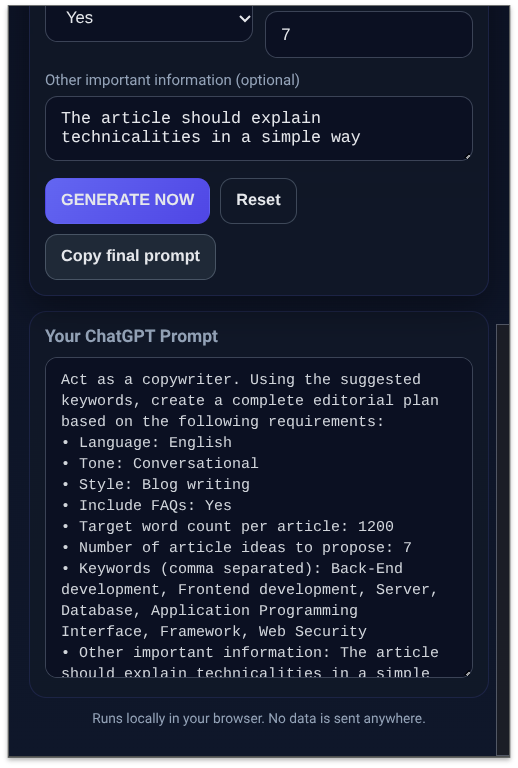
Buttons: GENERATE NOW, Reset, Copy final prompt.
-
A read-only output box with your generated prompt.
Tip: we also include an Open full page button that opens app.html in a normal tab, so the UI doesn’t close when your OS’s file picker opens during import.
Core behavior and best practices
-
Multi-format keywords
The parser splits on newlines first, but also accepts commas and semicolons. It trims spaces, ignores empty lines, and deduplicates. Paste directly from spreadsheets or SEO tools. -
Live keyword counter
As you type, paste, or import, a small counter updates so you always know how many unique keywords are detected. -
1:1 mapping to articles
If multiple keywords are provided, the tool sets the article count to match the number of unique keywords. This prevents duplicate keyword usage and keeps your plan organized. -
Gentle auto-adjust
When you leave the Keywords or article count field, the tool aligns the count to your keyword list and shows a subtle inline notice rather than intrusive alerts. -
Local persistence
The last set of values is saved to localStorage so you can pick up where you left off.
Example prompt the extension generates
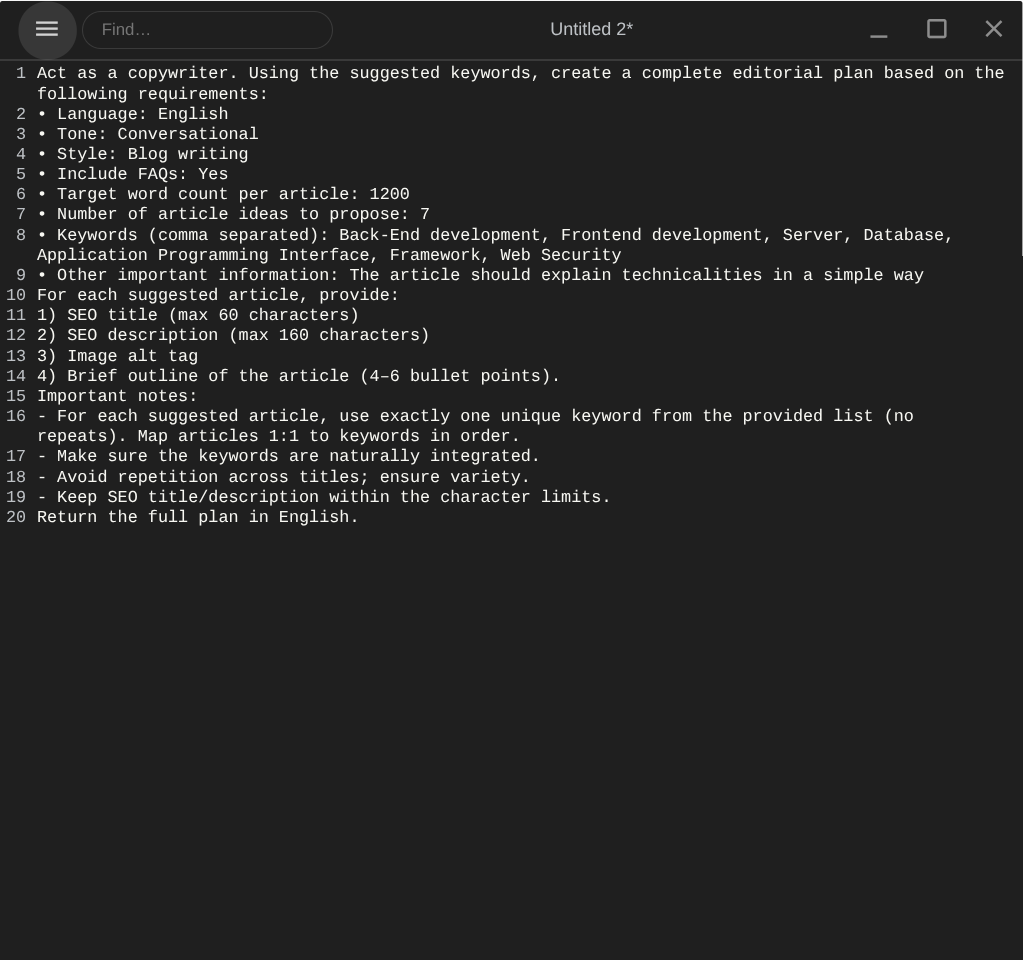
When you click GENERATE NOW, you’ll get a clean prompt like this (values will reflect your selections):
Act as a copywriter. Using the suggested keywords, create a complete editorial plan based on the following requirements:
• Language: English
• Tone: Professional
• Style: Blog writing
• Include FAQs: Yes
• Target word count per article: 1200
• Number of article ideas to propose: 8
• Keywords (comma separated): electric bike, city commute, battery life, Fiido T2, …
For each suggested article, provide:
1) SEO title (max 60 characters)
2) SEO description (max 160 characters)
3) Image alt tag
4) Brief outline of the article (4–6 bullet points).
Important notes:
– For each suggested article, use exactly one unique keyword from the provided list (no repeats). Map articles 1:1 to keywords in order.
– Make sure the keywords are naturally integrated.
– Avoid repetition across titles; ensure variety.
– Keep SEO title/description within the character limits.
Return the full plan in English.
Recommended workflow
-
Paste or import your keywords (one per line). The counter updates and duplicates are removed.
-
Set Language, Tone, Style, FAQs, and Word Count.
-
If you supplied multiple keywords, the tool enforces 1:1 keyword-to-article mapping automatically.
-
Click GENERATE NOW. Review the generated prompt in the output box.
-
Click Copy final prompt and paste it into ChatGPT.
Work in progress: suggested next features
-
Drag-and-drop import onto the keywords box.
-
Export keywords to
.txt. -
Presets for Tone/Style/Notes (e.g., “SEO blog default”, “Journalistic brief”).
-
Toggle to lock/unlock the 1:1 rule.
-
Informational counters for SEO limits (title ≤60 / description ≤160).
-
Options page to edit the Language/Tone/Style lists without touching code.
-
Simple UI i18n (switch the extension labels to your preferred language).
-
Backup/restore all fields as a JSON file.
Troubleshooting
-
The popup closes during file import: use the Open full page tab and import there.
-
Selects look empty: ensure the HTML includes inline options; JavaScript then validates and preserves them.
-
Buttons don’t respond: verify
popup.jsis loaded withdefer, then reload the extension inchrome://extensions.
Takeaways
Small, purpose-built tools can dramatically speed up editorial work. With just a handful of static files, you’ve built a privacy-first prompt generator that is fast, predictable, and extendable—no subscriptions, no compromises, and no data leaving your device.

Digital Designer, blog writer and also a tech enthusiast.
He loves to write content for blogs, podcasts, design websites, logos, brochures, banners and anything that sends a message to an audience.
You can contact Daniele at the link below: