
Ever had to use Google disavow tool and found yourself dealing with multitude of messy URLs? If so, you are not alone, please read on, you might get some help here!

After struggling with the manual cleanup of an enormous list of nefarious URLs that have backlinks to a client website (spam score above 40%), I have decided that there must a better way to do it…hence, here at dp we have made this tool just for that precise task. Make a clean list to upload it via the Google Search Console “Disavow” tool. If you are not familiar of what the “Disavow” tool is, below is a detailed explanation. You can also visit the Google Search Console – Disavow Links dedicated page and see for yourself. Additionally you can read Google’s explanation of how their tools work at this URL. Make sure you understand that our tool is not replacing Google’s one but preparing a clean list FOR the Google disavow tool so that you don’t get errors or no results at all.
Table of Contents
The Google Disavow Tool Explained
The Google Disavow Tool is a feature available in Google Search Console that allows website owners or webmasters to inform Google about certain links pointing to their site that they would like Google to disregard or “disavow” when considering the site’s search rankings.
In the context of search engine optimization (SEO), backlinks (links from other websites to your own) play a crucial role in determining a site’s authority and visibility in search engine results. However, not all backlinks are beneficial. There may be instances where a website has acquired low-quality or spammy links that could potentially harm its search rankings.
The Disavow Tool provides a way for webmasters to disassociate their site from these undesirable backlinks. By submitting a list of URLs or domains that they believe are harmful or irrelevant, webmasters are essentially signaling to Google that they would like those links to be ignored when evaluating their site’s ranking.
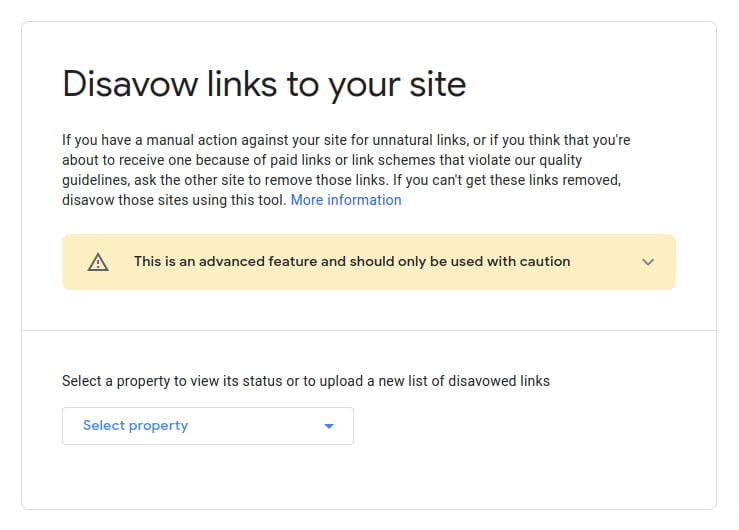
It’s important to note that the Disavow Tool should be used with caution and as a last resort. Google’s algorithm is designed to handle most problematic links automatically, and the tool is primarily intended for situations where a webmaster has been unsuccessful in removing harmful links manually. Improper use of the tool or incorrectly disavowing legitimate links can have negative consequences, potentially impacting the site’s search visibility.
Before resorting to the Disavow Tool, webmasters are generally advised to make efforts to remove unwanted links by reaching out to webmasters of linking sites and requesting removal, or by using the Google Search Console’s manual actions report to address any identified issues.
I would like to introduce you to a powerful tool called the Domain Extractor. This tool is designed to simplify the process of extracting main domains from a list of URLs. It can be particularly useful when working with large sets of URLs and you need to extract the primary domain names quickly and efficiently.
Purpose of the dp Domain Cleanup Tool for Google Disavow (Domain Extractor):
The Domain Extractor tool serves the following purposes:
-
Extracting Main Domains: It takes a list of URLs as input and extracts the main domains from each URL, excluding any subdomains, paths, or query parameters.
-
Domain Formatting: The tool ensures that the extracted domains are presented in a consistent format, making it easier to analyze and work with the data.
-
Removing Duplicates: The tool automatically removes any duplicate domains from the extracted list, providing you with a clean and unique set of main domains.
-
User-Friendly Interface: The tool offers a simple and intuitive web interface that allows you to input your list of URLs, extract the domains, and copy the results with just a few clicks.
How to Use the Domain Extractor:
Using the Domain Extractor tool is straightforward. Here are the steps to follow:
-
Enter URLs: Copy and paste your list of URLs into the provided input field on the tool’s web page. You can include multiple URLs, each on a new line.
-
Extract Domains: Click on the “Extract Domains” button to initiate the extraction process. The tool will extract the main domains from the URLs and present the results on the screen.
-
Review the Results: The extracted main domains will be displayed in a clean and organized format. Each domain will be prefixed with “domain:” to indicate its nature.
-
Copy the Results: To copy the extracted domains, click on the “Copy Results” button. The tool will copy the domains to your clipboard, allowing you to easily paste them into other applications or documents.
-
Reset or Start Over: If you want to clear the input field and start with a fresh set of URLs, you can click on the “Reset” button.
Benefits of the Domain Extractor:
The Domain Extractor tool offers several benefits, including:
-
Time-saving: Extracting main domains manually from a large list of URLs can be time-consuming. This tool automates the process, saving you valuable time and effort.
-
Data Consistency: The tool ensures that the extracted domains are presented in a consistent format, making it easier to analyze and work with the data.
-
Duplicate Removal: By eliminating duplicate domains from the results, the tool provides a clean and unique set of main domains for your analysis or further processing.
-
User-Friendly: The tool’s simple and intuitive interface makes it accessible to users of all levels of technical expertise. No coding knowledge is required to use this tool.
I hope this introduction to the Domain Extractor tool provides you with an understanding of its purpose, functionality, and benefits. It can significantly simplify the domain extraction process and enhance your workflow when dealing with large sets of URLs.
Feel free to explore the tool and let me know if you have any questions or need further assistance.
Thank you!

Digital Designer, blog writer and also a tech enthusiast.
He loves to write content for blogs, podcasts, design websites, logos, brochures, banners and anything that sends a message to an audience.
You can contact Daniele at the link below: