

Make a WordPress plugin: : For this week’s WordPress plugin, I would like to show you how you can have a plugin that has some sort of setting that can be changed from the WP dashboard.

Without going into extreme difficulty, let’s keep it nice and easy, our aim is to understand the concept.
So here comes your third plugin brief description of what it should do.
Let’s say you want to have an area of your website that displays a YouTube playlist so you don’t have to load all the videos manually. So our plugin should be able to do the following tasks:
- fetch the playlist from YouTube
- load the next video in the playlist
- repeat everything when the playlist is finished
Well, it shouldn’t be difficult. I will split this job in two parts, the easy part 1 is a demonstration of how you could have just the plugin with no settings. In the advanced part 2 we will implement the settings.
Right, let’s do this!
Table of Contents
Part 1 – Make a WordPress plugin Simple method
Here is an example of a WordPress plugin that will display a YouTube playlist from the provided channel URL:
Note: As we are already at the third video of this series, I will not explain again how to add the headers and how to zip the files and “make” the plugin to upload on WP, please have a look at the previous article 1 and article 2 for that information.
Alright, now let’s create a php file and call it youtube-playlist-dust.php where “dust” is the actual sci fi YouTube channel where we are going to fetch this amazing films for our WordPress plugin tutorial.
Here it comes….the code:
<?php

/*
* Plugin Name: YouTube Playlist Plugin
* Plugin URI: https://example.com/youtube-playlist-plugin
* Description: Displays a YouTube playlist on your WordPress site.
* Version: 1.0
* Author: Your Name
* Author URI: https://example.com
*/

function youtube_playlist_shortcode($atts) {
$atts = shortcode_atts(array(
'channel_url' => 'https://www.youtube.com/watch?v=HBxiEpIMSQY&list=PL2X2odndvaIcICvdgVso1pLmWC8a9AJtp',
), $atts);

$channel_url = $atts['channel_url'];

// Extract the playlist ID from the channel URL
preg_match('/list=([^&]+)/', $channel_url, $matches);
$playlist_id = $matches[1];

// Build the embed URL for the playlist
$embed_url = 'https://www.youtube.com/embed/videoseries?list=' . $playlist_id;

// Return the embed code for the playlist
return '<iframe width="560" height="315" src="' . $embed_url . '" frameborder="0" allow="accelerometer; autoplay; encrypted-media; gyroscope; picture-in-picture" allowfullscreen></iframe>';
}
add_shortcode('youtube_playlist', 'youtube_playlist_shortcode');
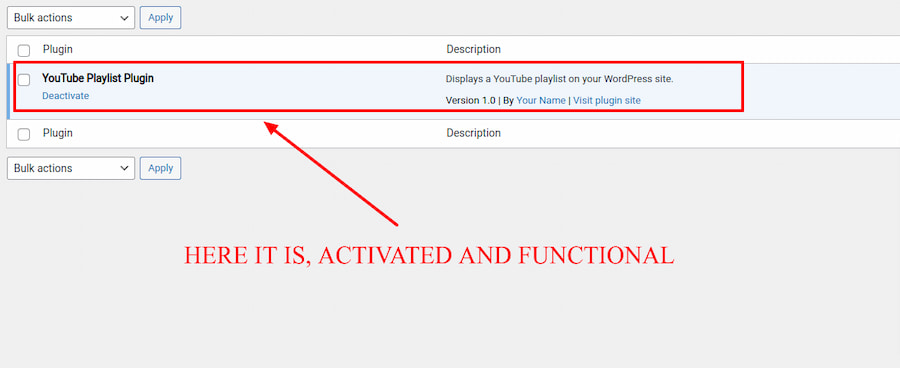
To use this plugin, simply copy the code and paste it into a new WordPress plugin file, then activate the plugin from the WordPress dashboard. Once the plugin is activated, you can use the [youtube_playlist] shortcode in any post or page to display the YouTube playlist.
For example, to display the playlist from the provided channel URL, you can use the following shortcode:
[youtube_playlist channel_url="https://www.youtube.com/watch?v=HBxiEpIMSQY&list=PL2X2odndvaIcICvdgVso1pLmWC8a9AJtp"]Great, so far so good, surely you have already tested the plugin and realized that it works well….but…now let’s try something different. What if we wanted to change the playlist regularly from the back-end by just adding the URL, rather than editing the webpage and shortcode?
How can that be done?
We would need some sort of setting from the back-end that allows us to enter the web address in a field and save everything in order to make the task of showing the videos as simple and functional as possible … so … how do we go about it?
Part 2 – Make a WordPress plugin Advanced method: Introducing the setting feature
Here is an updated version of the plugin that includes a settings page where the playlist URL can be set:
<?php

/*
* Plugin Name: YouTube Playlist Plugin
* Plugin URI: https://example.com/youtube-playlist-plugin
* Description: Displays a YouTube playlist on your WordPress site.
* Version: 1.0
* Author: Your Name
* Author URI: https://example.com
*/

function youtube_playlist_shortcode($atts) {
$atts = shortcode_atts(array(
'channel_url' => get_option('youtube_playlist_url'),
), $atts);

$channel_url = $atts['channel_url'];

// Extract the playlist ID from the channel URL
preg_match('/list=([^&]+)/', $channel_url, $matches);
$playlist_id = $matches[1];

// Build the embed URL for the playlist
$embed_url = 'https://www.youtube.com/embed/videoseries?list=' . $playlist_id;

// Return the embed code for the playlist
return '<iframe width="560" height="315" src="' . $embed_url . '" frameborder="0" allow="accelerometer; autoplay; encrypted-media; gyroscope; picture-in-picture" allowfullscreen></iframe>';
}
add_shortcode('youtube_playlist', 'youtube_playlist_shortcode');

function youtube_playlist_settings_init() {
// Add a new section to the Settings > General page
add_settings_section(
'youtube_playlist_section',
'YouTube Playlist Settings',
'youtube_playlist_section_callback',
'general'
);

// Add a new field to the section
add_settings_field(
'youtube_playlist_url',
'Playlist URL',
'youtube_playlist_url_callback',
'general',
'youtube_playlist_section'
);

// Register the setting
register_setting('general', 'youtube_playlist_url');
}
add_action('admin_init', 'youtube_playlist_settings_init');

function youtube_playlist_section_callback() {
echo 'Enter the URL of the YouTube playlist you want to display on your site:';
}

function youtube_playlist_url_callback() {
$youtube_playlist_url = get_option('youtube_playlist_url');
echo '<input type="text" name="youtube_playlist_url" value="' . $youtube_playlist_url . '" class="regular-text">';
}
In this variant of the plugin you can read from the code that we have implemented a couple of functions that add:
- Additional functions in the WordPress back-end settings in the “general” page for the “YouTube Playlist Settings”.
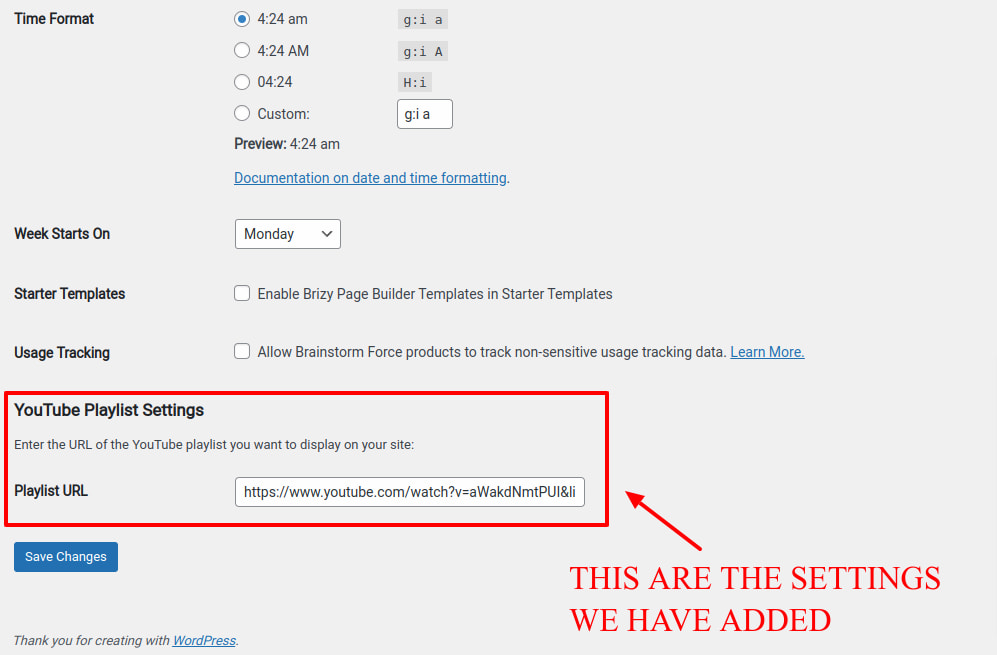
- Added a field to enter the playlist URL in setting>general page with the label: “Enter the URL of the YouTube playlist you want to display on your site:” and the input field: “Playlist URL.”
- A function to record the additional settings
Here is your new plugin for YouTube playlist from the back-end dashboard of WordPress.
You can set the playlist URL by going to Settings > General and scrolling down to the “YouTube Playlist Settings” section.
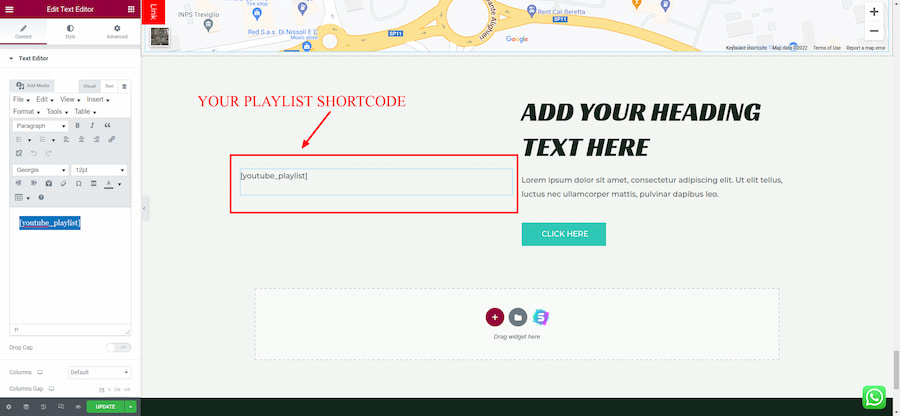
To display the playlist on your site, use the [youtube_playlist] shortcode in any post or page. The shortcode does not need any attributes, as it will automatically use the playlist URL set in the plugin settings.
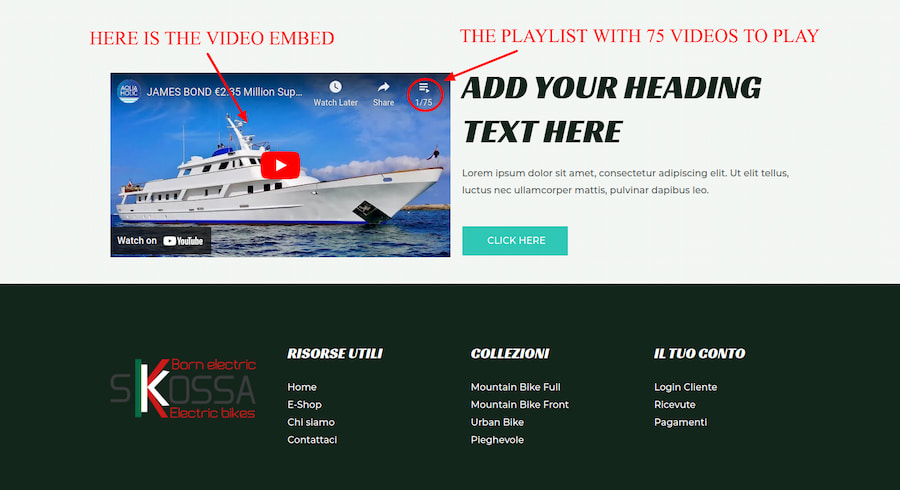
Fantastic, now your playlist is much easier to set, anytime you like to change it. Below is an image to show how the plugin looks.
In this third article we were able to see how a plugin can also have its own settings to better control its functioning.
Well, that was the last part of this mini-series, at this point you can experiment some more by creating your own plugins that add useful features to your site and can be turned on and off whenever you like.
Enjoy your creativity!
Key Web Technology & Development Keywords
-
WordPress
-
Meaning: An open-source Content Management System (CMS) and PHP framework that powers dynamic websites and allows modular extension via custom themes and plugins.
-
-
Plugin
-
Meaning: A self-contained piece of software or code snippet that hooks into a web platform to add specific features, tools, or functionality without modifying core files.
-
-
PHP
-
Meaning: The server-side scripting language executed on the web server to run logic, connect to databases, and dynamically generate HTML content for the browser.
-
-
Hooks
-
Meaning: WordPress core architectural mechanisms—comprising Actions (to execute custom code at specific events) and Filters (to modify data before it is rendered or stored)—that enable safe, non-destructive customization.
-
-
Shortcode
-
Meaning: A small macro tag (e.g.,
[custom_element]) created in code that allows users to easily embed dynamic UI elements or functional scripts directly into posts, pages, or widgets.
-
-
Sanitization
-
Meaning: The security process of cleansing, validating, and filtering raw user input before storing it in the database to prevent vulnerabilities like SQL Injection.
-
-
Escaping
-
Meaning: The practice of encoding data before rendering it to the browser’s HTML output, ensuring that untrusted content cannot execute malicious scripts (preventing Cross-Site Scripting / XSS).
-
-
UI
-
Meaning: User Interface—the visual elements, layouts, forms, buttons, and control panels through which a user interacts with a software application or website.
-
-
Dashboard
-
Meaning: The administrative back-end interface (wp-admin) where site administrators configure options, manage plugins, and control site settings.
-
-
Database
-
Meaning: The organized relational storage system (such as MySQL or MariaDB) used to store persistent site configurations, user data, posts, and plugin settings.
-
-
CSS
-
Meaning: Cascading Style Sheets—the technology used to style and structure the visual presentation, color schemes, typography, and responsive layout of web interfaces.
-
-
JavaScript
-
Meaning: The programming language executed client-side in the browser to create dynamic interactions, asynchronous updates (AJAX), and interactive UI behaviors.
-

Digital Designer, blog writer and also a tech enthusiast.
He loves to write content for blogs, podcasts, design websites, logos, brochures, banners and anything that sends a message to an audience.
You can contact Daniele at the link below:


