

Blog article reference links are extremely important to a blog’s search engine optimization efforts.

These links are a great way to spread out the content of a blog post and build credibility among readers. However, it’s important to keep in mind that too many references can drown out the main call to action. It’s better to include a couple of references per post, especially if they add credibility and support the main article topic. It’s also a good idea to build series of blog posts, as this will give you more real estate and spread out important links over a greater number of pages. This will also help you improve your SEO and content pathways.
Table of Contents
Blog article reference links: Internal links won’t tank your search performance
Adding internal links to your blog can help visitors find related content. Not only that, but it can also pass PageRank throughout your website. Too much internal linking can dilute PageRank, which is why you should be mindful when building your internal linking strategy. Using topic clusters is one effective way to maximize the value of internal links. Each topic cluster consists of a pillar page and many supporting pages.
Internal links are hyperlinks that point to pages within the same website. These links aid in discoverability because they give search engines context for the pages within your site. This is particularly beneficial for long-tail keywords. Long-tail keywords are less competitive and can benefit from this link system. It’s important to note that internal links aren’t a substitute for external links. But, they can boost your search performance if you use them correctly.
Internal links can highlight the most important pages on your site. This will increase the page’s relevance in the eyes of Google, which tries to serve the best content possible. Using internal links in a smart way can increase the page’s search engine ranking and improve the user experience.
Remember to use relevant anchor text for your internal links. Your anchor text should align with the content on the linked page, or else Google won’t promote your content. Using proper anchor text will also help your site distribute PageRank, which is the measure of a page’s popularity. Every time a page links to another, it passes along a small amount of PageRank to the new page.
Internal links are vital for search engine optimization. They not only pass on the value of the link to your visitors, but they also enhance your website’s hierarchy. Internal links increase the page’s ranking because Google considers a web page with more links to be important than one with less.
The importance of internal links for SEO has been confirmed by Google and John Mueller. According to Google’s patent, internal links help to show the relationships between pages and topics. Internal links also help increase dwell time, which is a measure of how long a Google searcher stays on a web page.
Internal links can also increase the user experience and reduce bounce rates. Placed at the beginning of an article, they keep readers interested and on the page, which is what you want. Besides, internal links help Google discover important pages of your website, so you should make sure to place them all throughout your content.
Increasing the amount of internal links in a blog is an excellent way to boost PageRank and improve user engagement. However, you must make sure that you choose the right pages to place them. It is best to place your internal links on high-ranking pages – those with high difficulty scores – and avoid placing them on lower-ranking pages.
Blog article reference links: Relevant external links are the backbone of the web
If you want to build links to your site, you need to create content that is relevant to your readers. Google looks at both quantity and quality when evaluating link building efforts. Relevant external links will help you increase your rankings in Google search. But be careful: if you want to build links, you must be careful with the anchor text that you choose. It should be at least two words, and it should be as short as possible.
One advantage of relevant external links is that they improve user experience. When users type a query into Google, they’re looking for specific information. Once they find your content, they may want to find out who wrote it. A relevant external link can give them the additional information they need.
Links are the backbone of the web. Without them, the Internet would be a disorganized mess. BackRub helped organize the hierarchy of pages through a citation system, but that system is still evolving. A relevant external link is one that points to a target page on another domain, and isn’t part of the host domain.
Don’t use too many external links on a blog. Too many external links can distract readers and push them away from your content. However, you can justify a few in a list or roundup post. But overdoing it will not only turn off your audience, but will also hurt your SEO efforts. Make sure you use keyword-based anchor texts that make sense for both readers and search engines.
Benefits of attribution in blog article reference links
When you cite an article, blog post, or other piece of information, you should cite the source. It is important to acknowledge where the information comes from, as this will make it easier for readers to understand where it originated. The best practice is to include a link to the original source.
Here’s the dp offer
Don’t worry, it doesn’t cost anything, (just your time).
I just want to show you how I solved this little detail by creating a great tool to create internal and external links in a jiffy.
Internal Links: There may be a tool for sure but we create our own
So let’s start with internal links, and let’s say right off the bat that this is definitely not a solution that can fit every possible and imaginable scenario, but let’s imagine that:
- you’re a blogger and you’ve been writing for the same blogs every week for more than a year
- you are a marketer and you have to curate a narrow selection of blogs for some of your clients, so you have to plan the work to be delivered in outsource to your favorite ghost writer
- you are an agency and have an extensive selection of blogs that you take care of weekly or every other week
Well, if you fall into one of these categories, then you might want to follow the method we are going to list here.
First of all, the thing you most need, when you have to write several articles each week, and you want to create internal and external links for each of them, is a streamlined, productive, and above all fast method. Here, for example, let’s imagine that you write each week for a Marketing Blog, a Real Estate Blog, a Health & Wellness Blog, and finally a Food & Beverage Blog.
Practically every week you will have your articles prepared in your planner and you will know what you are going to talk about (or at least broadly speaking).
Since these articles always come from the same websites, creating internal links will be an easy task because surely after 6 months or a year of writing for those blogs you will have created enough content to create your references.
If you use WordPress you could use plugins that do just that, they add snippets here and there on the page where they make links to your other articles.
Unfortunately, though, you’ll most certainly find after a while that these don’t always reference an article on your blog relevant to the topic you’re writing about today.
So from time to time, you’ll start making manual corrections here and there. I mean in the end it’s not worth it, if you have to have an extra plugin installed in your WordPress and then do the work manually, as they say in Italy (don’t ask me why cos I don’t have a clue), “the game is not worth the candle”. So what do you do?
I, for my part, solved it this way:
I created a very simple web page (in HTML), I didn’t even put it live, for me it’s fine to use it from “localhost”, but it could also reside on your server and be accessed from any computer if that’s better for you.
In this web page I created query boxes where I put a title to identify the blog site I am writing to each week, a site search query string, and the logo of the site in question just to help me visualize the boxes better and immediately identify which box to use for this or that site I am writing today.
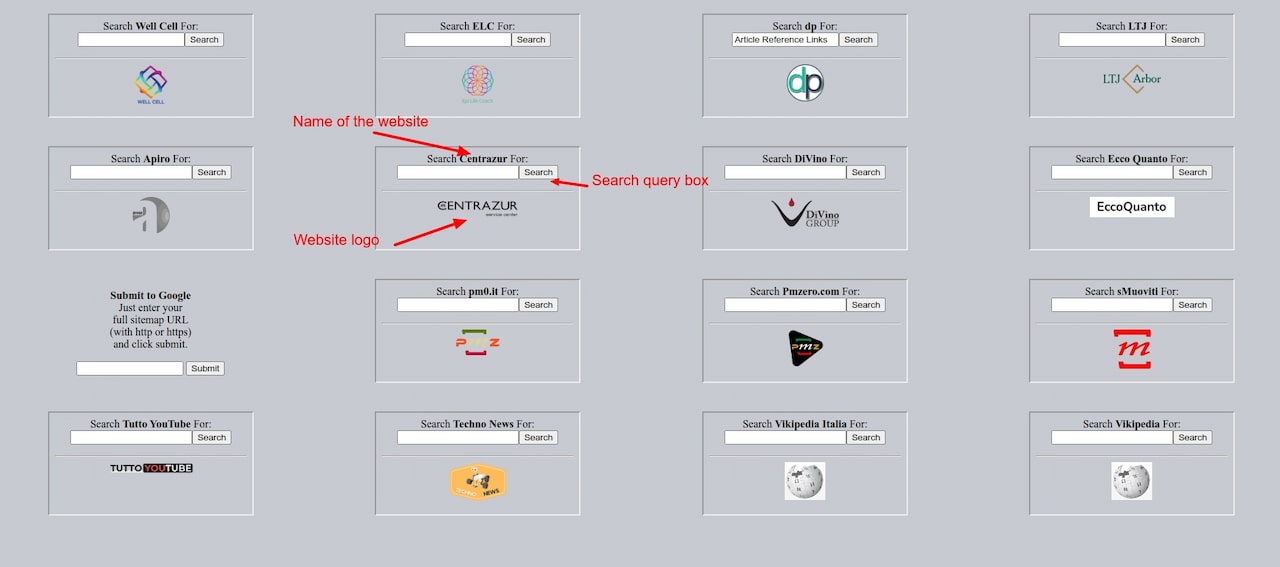
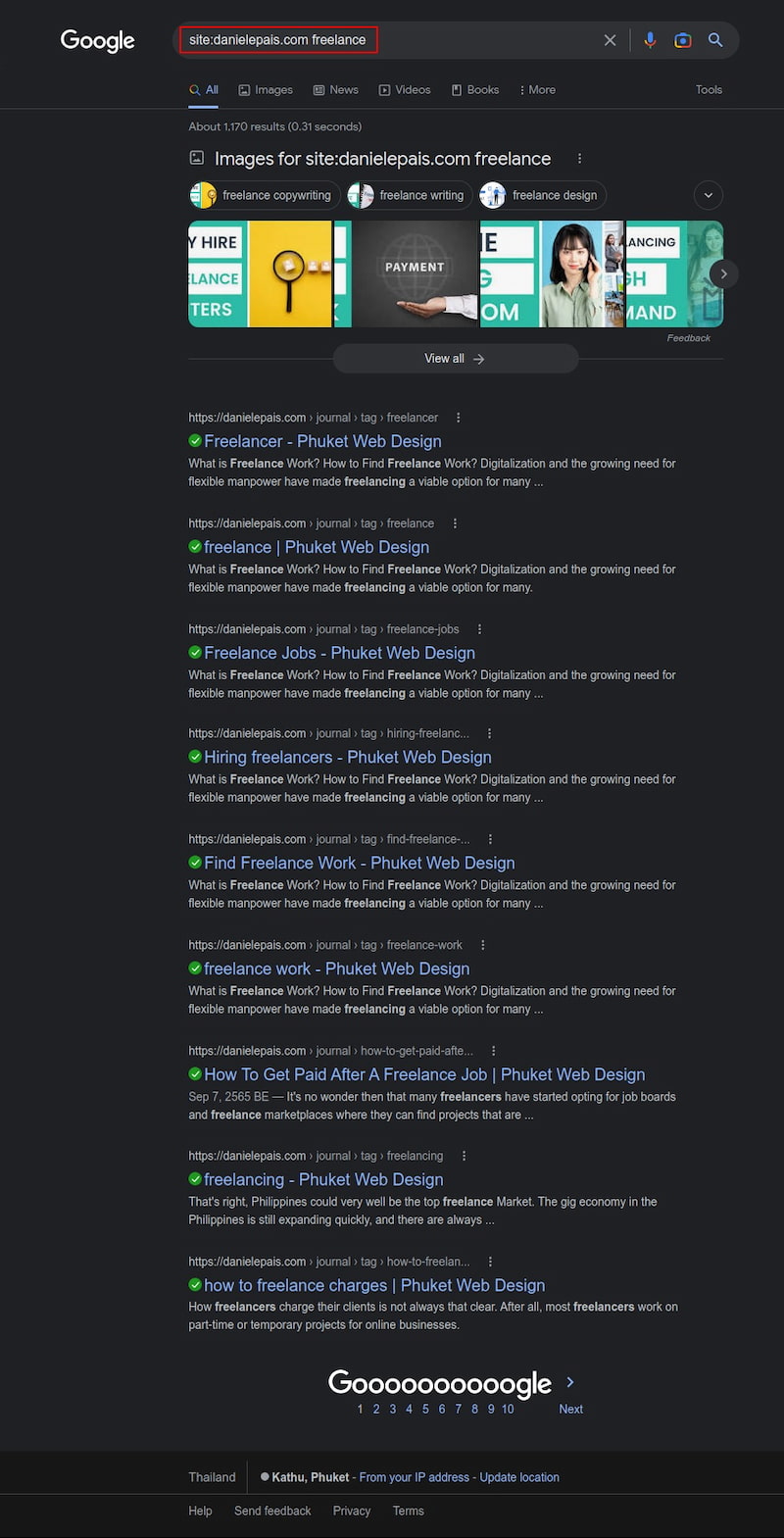
All right, now let’s imagine that every let’s say Thursday, I write an article for my blog and in this case the article is about working as a freelancer, so if I wanted, in an immediate way, to create an internal link, all I would have to do is enter the keyword “freelancer” in the dp query box and hit the search button.

Immediately, this will open a new browser tab with all the references to that keyword, obtained from the google search for the dp site.
Here is the code for each of the boxes:
<script type="text/javascript">

//Enter domain of site to search.
var domainroot="danielepais.com"

function Gsitesearch(curobj){
curobj.q.value="site:"+domainroot+" "+curobj.qfront.value
}

</script>


<form style="text-align: center;" action="http://www.google.com/search" target="_blank" method="get" onSubmit="Gsitesearch(this)">

<p>Search <strong>dp</strong> For:<br />
<input name="q" type="hidden" />
<input name="qfront" type="text" style="" /><input type="submit" value="Search" /></p>
</form>
<hr>
<div align="center"><img src="images/dp-logo-2017.png" width="55px"></div>
Yes I know, some of you might say just launch a google search and type into the browser “site:danielepais.com freelance,” but honestly I don’t feel like typing all that stuff every time.
There are also sites I write to, that have long URLs consisting of multiple words with a hyphen in between, and I used to have to type the manual query more than once all the times.
Reason being, one fine day I devoted an hour or so and created this page as a global search query and I must say that I create better internal links now (more targeted) and much faster.
Here is also a tool for external links
As far as external links are concerned, or at least as far as I and my writing work in the blogs for which I am the editor are concerned, I have found myself always using the same websites as providers of external links with some authority.
These sites are:
- CNN
- Bloomberg
- ABC
- NBC
- CBS
- USA Today
- Fox News
- Daily Mail
- Washington Post
- Business Insider
- BBC
- CNET
- The Guardian
- MSN
- npr
- Mashable
- Daily Telegraph
- Miror
- Engadget
- Tech Crunch
- Statesman
- New York Times
- Vikipedia
I then created another web page, but this time I opted for a drop-down list instead of creating the boxes as in the tool for internal links. The query box in this tool has a field to enter the keyword for which we want to do a search and another field just below the first one, where you can choose which site to do the search in.
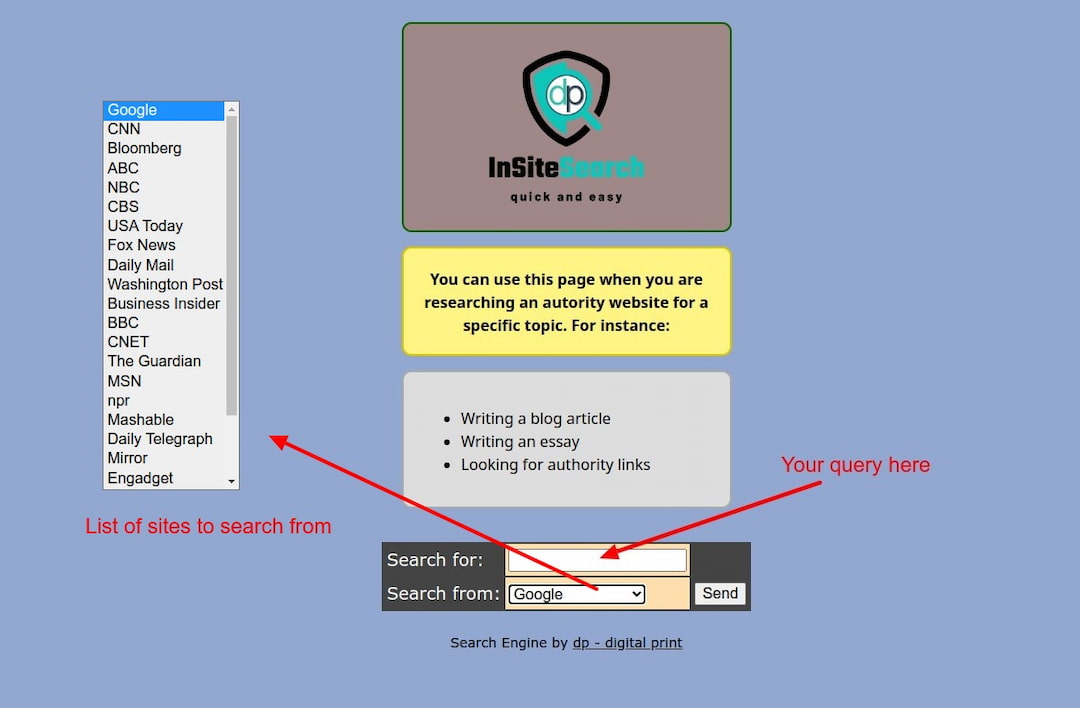
The latter you can also find online at this URL:
https://insitesearch.danielepais.com/index.html
Well, I hope I have been helpful and inspiring. Unfortunately, I had to stop commenting on this blog because I have to solve the spam problem I’ve been getting lately and now I just don’t have time to do it (quite high).
If you want to contact me or need help implementing something similar, or even just to ask me for advice you can do so via the facebook page for dp or by emailing me from this URL: https://danielepais.com/index.html#form2-8
Well, see you very soon with new topics and articles.

Digital Designer, blog writer and also a tech enthusiast.
He loves to write content for blogs, podcasts, design websites, logos, brochures, banners and anything that sends a message to an audience.
You can contact Daniele at the link below:


