

Alright, in this week project I have created a One page scroll fixed top menu free Elementor template wire-frame that can be used for generic purposes, such as presentation of a product, an event, launch of an e-book, e marketing campaign and so on.

This template is designed with Elementor Free and a few other free plugins that I am gong to list below so that you know in advance what you are going to get with the website image:
- Elementor (the free version)
- Classic Editor
- Contact Form 7
- ElementsKit Elementor addons
- Free Assets Library
- myStickymenu
- Premium Addons for Elementor
- All-in-One WP Migration

One quick note on the classic editor which is optional. I personally don’t like the block editor so I use the classic in all my installations. As for the contact form I have used the contact form 7 plugin, but you can easily replace with wp-forms, ninja forms or whichever suits you best.
As I wanted the landing page to have a sticky menu but Elementor doesn’t have it in the free version, I have opted for the “myStickymenu” plugin which in its free version offers a basic set of options that for this purpose are just fine.
Your Download zip file contains the main json template the images (slideshow etc.) plus the main image file to install the entire demo site into your localhost environment. (I use bitnami on localhost).
Table of Contents
Installation
IMPORTANT
Please make sure you understand that the All In One Backup / Migrate image is meant to be used on a fresh install where you have just installed WordPress and you do not have any content created as the installation process will WIPE OUT YOUR CURRENT WORDPRESS AND SUBSSTITUTE WITH ITS OWN VERSION.
It is therefore strongly suggested that you test this project on a spare site or a staging site NOT a PRODUCTION.
How to install the image file
- Install All-in-One WP Migration plugin on your local staging site (a clean WP with no content)
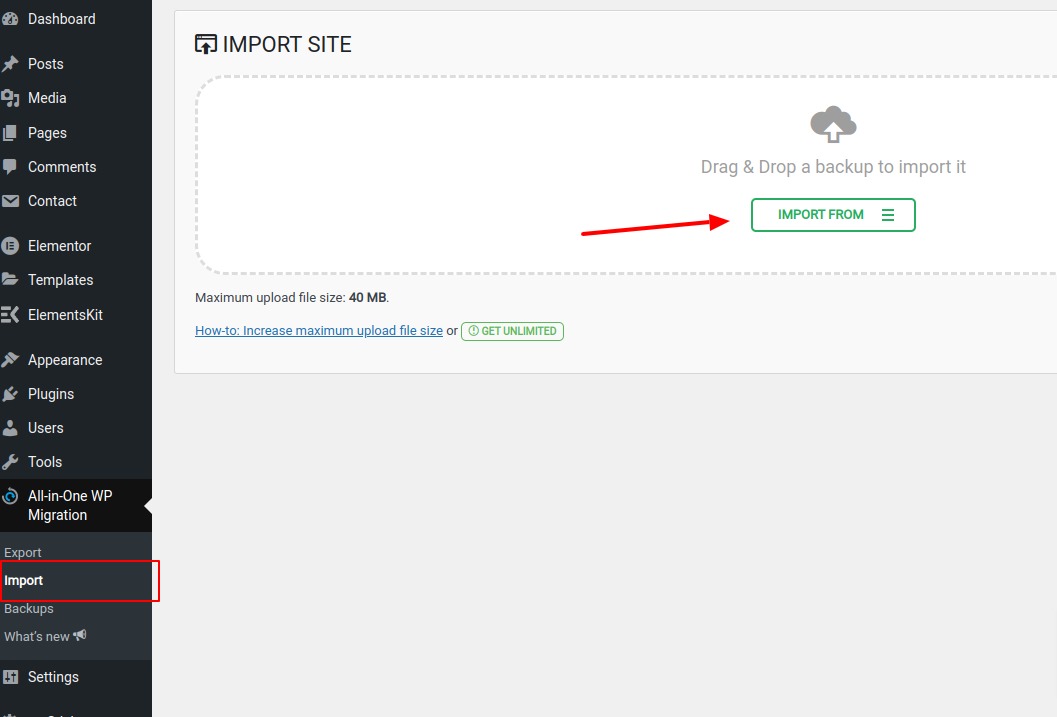
- From the Left menu under the tab for All In One WP Migration select import
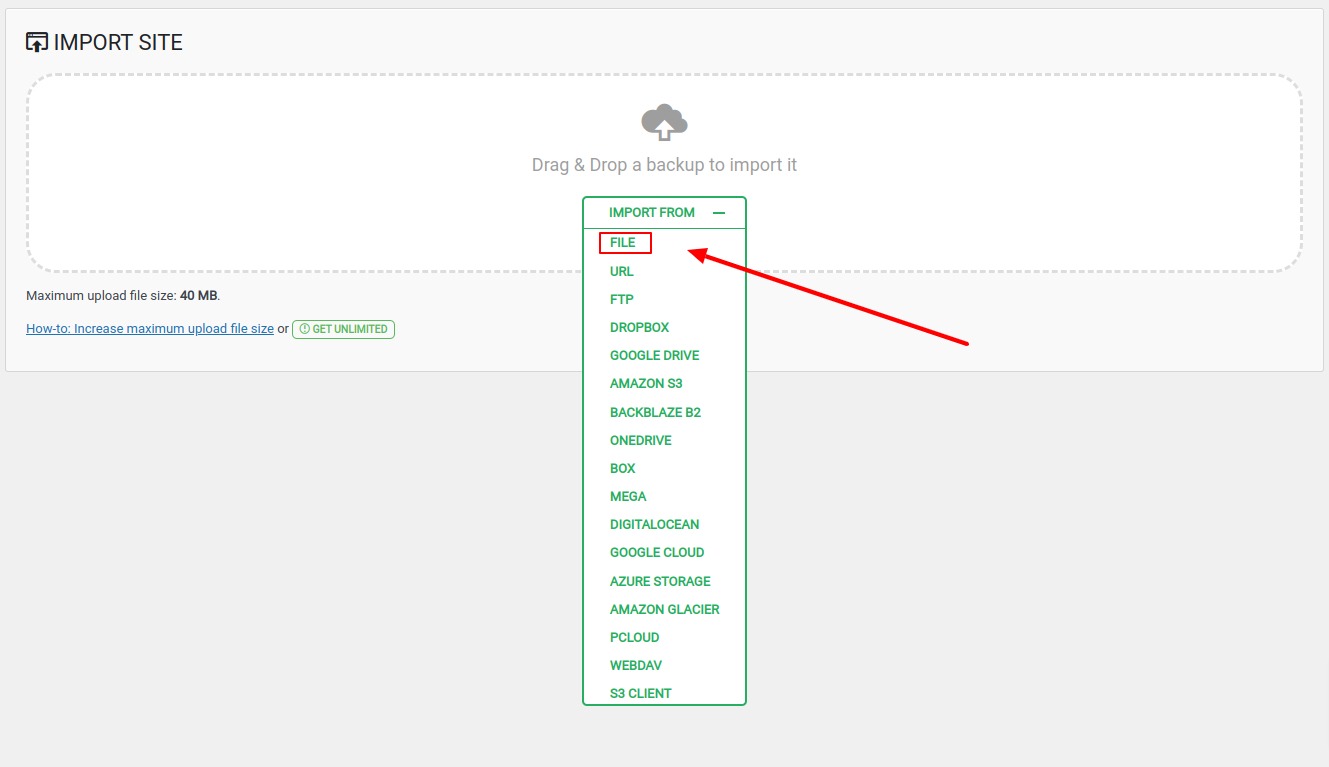
- On the next step select import from file and then load the image from the zip file (localhost-wordpress-20221209-174353-m37bjp.wpress).
- Once you have imported the site image your new login will be as follow:
Admin: user
Pass: 6264 - Change the admin email address on WP Setting back to yours (currently my email).
- If all went correctly the landing wireframe will be the homepage for the new WP site. (see the image below)

Common issues on image file installation
The installation file is 78 mb, so make sure your WordPress environment can upload such a big file, if not please do any of the following:
Solution 1: Contact your hosting company’s customer service
And request that they increase these limitations for you. Requesting error logs from your website’s hosting company will help you identify the issue quickly if you are still unable to import your file. Check the logs for the period of time when you attempted to import the backup. You’ll be able to see what limit you’ve reached, and raising it will fix the problem.
Solution 2: Edit your .htaccess and wp-config.php files
If the previous solution 1 did not work or you were unable to contact your hosting provider you can try editing your .htaccess and wp-config.php files:
Edit .htaccess file
php_value upload_max_filesize 128M
php_value post_max_size 128M
php_value memory_limit 256M
php_value max_execution_time 300
php_value max_input_time 300
Edit wp-config.php file
@ini_set( 'upload_max_filesize' , '128M' );
@ini_set( 'post_max_size', '128M');
@ini_set( 'memory_limit', '256M' );
@ini_set( 'max_execution_time', '300' );
@ini_set( 'max_input_time', '300' );
IMPORTANT:
Please make sure you understand that a misconfiguration in both the .htaccess or the wp-config.php files can cause your site to display errors code (such as error 500) hence be unusable. Always be careful when editing your configurations files and make a backup before you overwrite them.
Disclaimer
Before using this script make sure you have read the instructions and warning above, Failure to do so can lead to loss of data and your entire website. I do not take responsibilities for such an event.
Download link
Free Elementor Landing Page template (164 downloads )
Digital Designer, blog writer and also a tech enthusiast.
He loves to write content for blogs, podcasts, design websites, logos, brochures, banners and anything that sends a message to an audience.
You can contact Daniele at the link below:


