Bulk PageSpeed Scanner for web pros — run Lighthouse audits in bulk, export results, and optimize faster with lifetime access.
Table of Contents
Introduction
If you manage multiple websites or handle performance audits for clients, you already know how time-consuming it is to test every page individually through Google’s PageSpeed Insights or Lighthouse.
The Bulk PageSpeed/Lighthouse Scanner from DigitalPrint.dev solves this exact problem.
This lifetime web application empowers developers, SEO experts, and digital marketers to analyze dozens—or even hundreds—of URLs simultaneously, saving valuable hours while ensuring accuracy and consistency across all tests.
What Is the Bulk PageSpeed/Lighthouse Scanner?
Built for web professionals, this tool automates the entire Lighthouse and PageSpeed testing process. Instead of running individual scans, you can upload or paste a list of URLs and let the app do the heavy lifting.
In a matter of minutes, you receive detailed metrics for every page: Performance, Accessibility, SEO, Best Practices, and Progressive Web App readiness.
The data is displayed in an intuitive dashboard, making it easy to identify performance issues and prioritize optimizations.
Key Features That Make It Stand Out
Bulk Scanning Made Simple
Forget about manual testing. With bulk mode, you can scan multiple pages or entire websites in one go—an enormous time-saver for agencies and freelancers managing several projects at once.
In-Depth Metrics and Lighthouse Accuracy
The app uses the official Google Lighthouse API, ensuring reliable results.
You’ll get comprehensive scores for:
-
Performance (Core Web Vitals included)
-
Accessibility
-
Best Practices
-
SEO
-
PWA (Progressive Web App) compatibility
Each category offers granular data that helps pinpoint exactly where your site can improve.
Organized Projects and Export Options
The scanner lets you save scan results as projects and export data as CSV or Excel files. This feature is ideal for:
-
Generating client reports
-
Comparing results over time
-
Tracking performance improvements after optimizations
One-Time Lifetime Access
Unlike typical subscription models, DigitalPrint.dev offers this tool with a lifetime deal — pay once, use forever.
This model provides unbeatable long-term value, especially for developers or agencies who run audits regularly.
Intuitive Interface
No steep learning curve here. The interface is clean, fast, and efficient.
You can start scanning within minutes, without needing API keys, complex setup, or technical configuration.
Real-World Applications
For Web Development Agencies
Run full-site audits before delivery or during maintenance cycles. Identify performance bottlenecks and ensure that all pages meet Google’s standards before launch.
For SEO Specialists
Monitor multiple landing pages or client sites in bulk. Quickly locate pages that underperform in Core Web Vitals and prioritize fixes that affect rankings.
For Digital Marketers
Test campaign landing pages for speed and UX quality. Faster load times mean better engagement and higher conversion rates.
For Website Administrators
Keep large, content-rich websites in top shape. The scanner provides a bird’s-eye view of the entire domain’s performance in one single report.
Why Web Professionals Love It
-
Massive Time Savings: Scan multiple URLs in minutes instead of hours.
-
Data Consistency: Standardized Lighthouse audits ensure comparable results across all pages.
-
Professional Reports: Exported data looks great in presentations and client summaries.
-
Scalable Workflow: Handle multiple sites, domains, or campaigns without limits.
-
Cost Efficiency: Lifetime access means zero recurring fees — a smart investment for any professional toolkit.
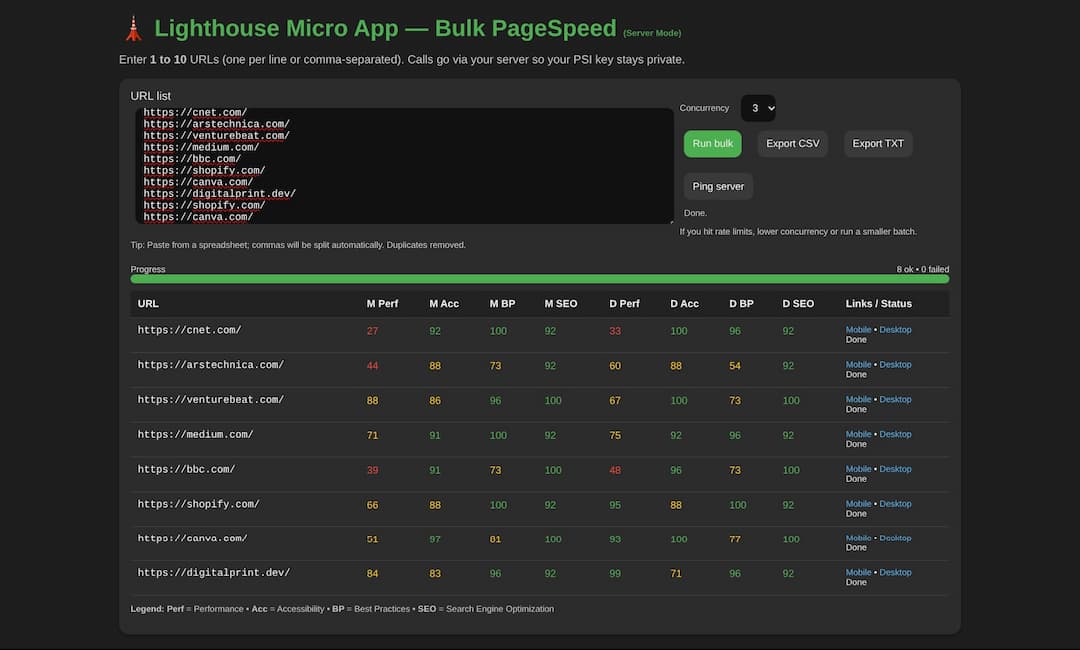
Websites scanned on our test
1. CNET
A major tech media outlet known for gadget reviews, news, and buying guides. The site combines heavy multimedia content with ad scripts and tracking elements — ideal for showcasing how large news portals handle performance trade-offs.
2. Ars Technica
A tech journalism site focused on in-depth articles about science, software, and IT policy. Its clean design and balanced content-to-code ratio make it a good example of how editorial platforms can maintain decent performance without compromising readability.
3. VentureBeat
A publication covering AI, startups, and tech innovation. VentureBeat uses a modern WordPress-style layout with multiple ads and embedded content, which makes it a strong case for testing real-world Core Web Vitals on content-heavy pages.
4. Medium
A minimalist publishing platform that prioritizes typography and white space. Its simplicity and standardized structure often yield high Accessibility and SEO scores — excellent for understanding what a well-optimized content-first design looks like.
5. BBC
One of the world’s most visited news websites. With massive global traffic and continuous content updates, BBC.com is a perfect benchmark for testing how large-scale, media-rich portals balance speed, images, and interactivity.
6. Shopify
A highly optimized SaaS website promoting its e-commerce platform. Shopify’s marketing pages are built with performance in mind, making it a great comparison point for seeing how commercial landing pages achieve fast load times and high Lighthouse scores.
7. Canva
A design app running directly in the browser. Since it functions more like a web application than a traditional website, Canva is excellent for testing Progressive Web App (PWA) metrics and understanding how interactive front-end frameworks affect performance.
8. DigitalPrint.dev
A curated platform offering lifetime tools for developers, freelancers, and digital marketers.
Honest Limitations
While the tool delivers excellent functionality, users should note a few considerations:
-
API Rate Limits: Heavy scans might occasionally hit Google’s PageSpeed API limits (the app usually handles this gracefully).
-
Score Fluctuations: Lighthouse results can vary slightly between runs due to server or network conditions.
-
No Auto-Optimization: It focuses purely on analytics, leaving performance tweaks to your development team — which is often preferable for professional users who value control.
Verdict: A Smart, Time-Saving Investment
The Bulk PageSpeed/Lighthouse Scanner is more than a convenience — it’s a productivity accelerator for anyone serious about web performance and SEO.
It transforms a repetitive, manual task into an automated, efficient process that delivers actionable insights in record time.
For agencies, developers, and SEO professionals looking for a reliable, no-subscription solution, the lifetime access model makes this tool a no-brainer.
Final Thoughts
With its blend of automation, accuracy, and simplicity, the Bulk PageSpeed/Lighthouse Scanner deserves a place in every web professional’s toolkit.
Whether you’re auditing client sites, optimizing for SEO, or maintaining large projects, this tool helps you focus less on testing — and more on improving.
Bulk PageSpeed/Lighthouse Scanner
Scan multiple URLs in minutes. Try it now or lock in the lifetime deal.

Digital Designer, blog writer and also a tech enthusiast.
He loves to write content for blogs, podcasts, design websites, logos, brochures, banners and anything that sends a message to an audience.
You can contact Daniele at the link below: