

In today’s digital world, your email signature is far more than a closing line — it’s your personal brand, your virtual business card, and often the first impression you make.

Every email you send is an opportunity to communicate professionalism, build trust, and reinforce your identity.
Yet, despite its importance, many professionals either ignore their signature or struggle endlessly with formatting, design inconsistencies, and compatibility issues. This is where the Email Signature Generator by DigitalPrint.dev steps in — a simple, smart, and once-and-for-all solution for creating a modern and polished email signature in just minutes.
Table of Contents
Why an email signature matters more than you think
Your email signature might seem like a small detail, but in professional communication, details matter. A well-designed signature communicates attention to detail, reliability, and care. It can instantly elevate how clients, partners, and prospects perceive you.
Think of it as a digital handshake — consistent, elegant, and memorable. Every element of a good email signature — your name, title, logo, contact details, and social links — should work together to communicate a strong professional image. Without one, your emails might look incomplete or even untrustworthy.
The hidden costs of doing it wrong
Many users underestimate the time and frustration involved in manually designing an email signature. You try to build one in Gmail or Outlook, and suddenly the formatting breaks. The image alignment is off. Your phone number turns blue. The logo disappears on mobile. And after an hour of tweaking, the result still looks inconsistent across devices.
Now multiply that by every employee in a company. That’s not just a design issue — it’s a brand consistency problem that affects how your business is perceived.
The Email Signature Generator solves this pain once and for all.
What makes this tool different
Unlike online services that charge a monthly subscription for something as simple as an email signature, this tool from DigitalPrint.dev offers a lifetime deal. You pay once and own it forever — no hidden fees, no recurring payments.
It’s designed to be fast, intuitive, and effective. With a few clicks, you can generate a ready-to-use signature compatible with major email clients like Gmail, Outlook, Yahoo Mail, Apple Mail, and Thunderbird.
Key features professionals love
-
Clean, modern design templates – Choose from layouts that adapt to any brand style.
-
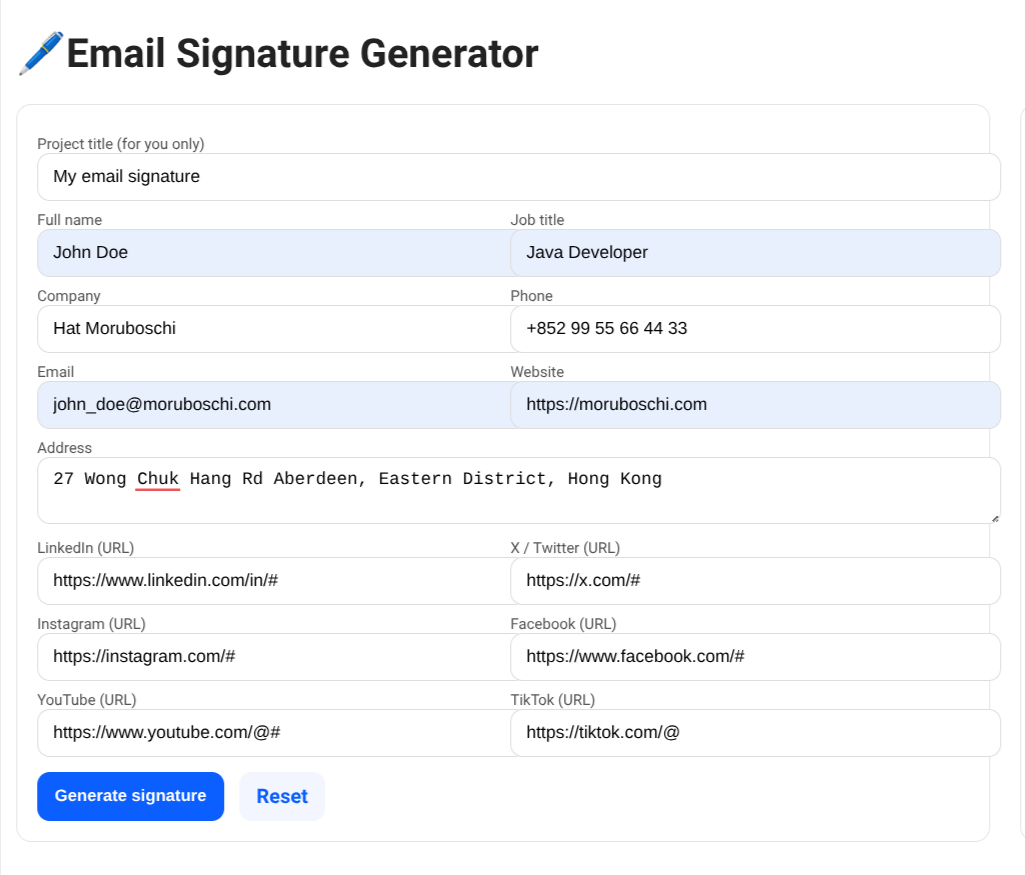
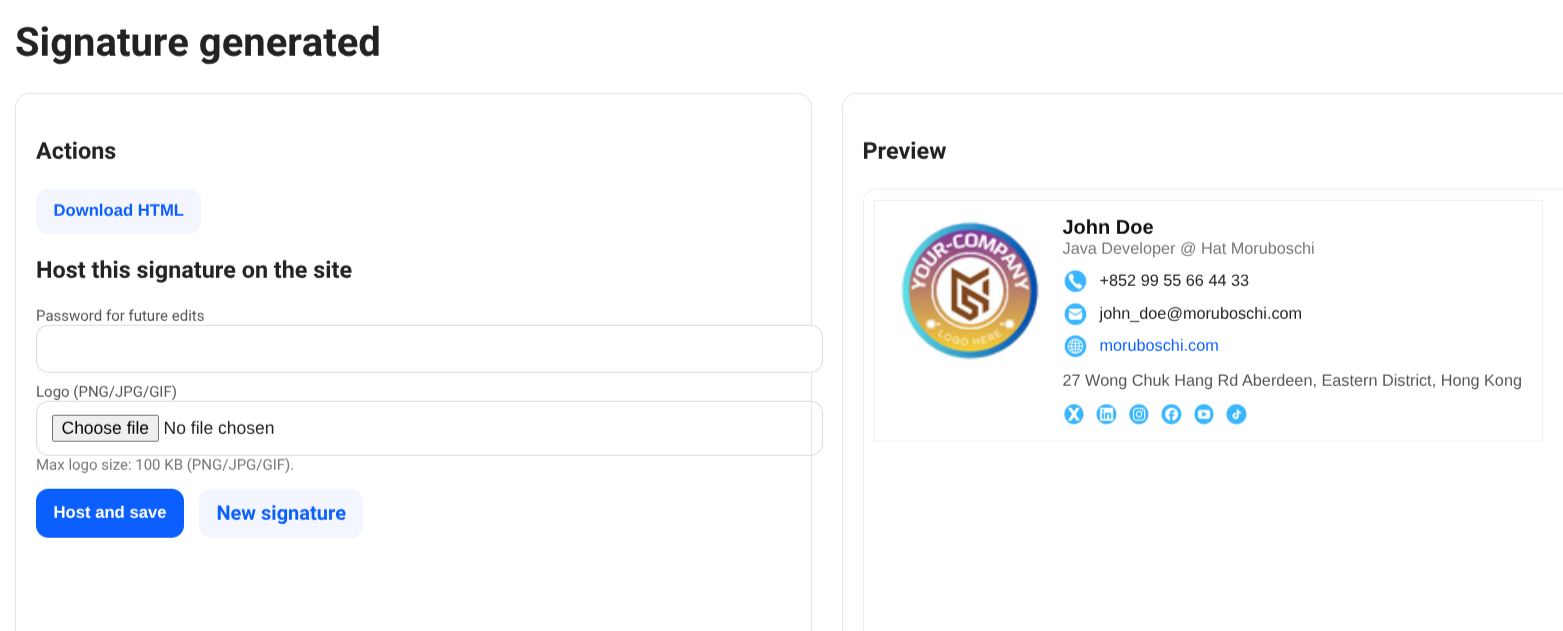
Instant preview – See the final result in real time before copying it into your email client.
-
Copy-and-paste simplicity – No coding required.
-
Fully responsive output – Works perfectly on desktop and mobile.
-
Custom fields – Add job titles, websites, social icons, or logos effortlessly.
-
Online usability – Create and store your signature without the need for cloud-based accounts.
For professionals, freelancers, and teams, it’s the perfect blend of simplicity and control.
This isn’t just about saving time — it’s about creating a visual identity that speaks for you every time you hit “Send.”
Solving a universal problem once and for all
For years, creating an email signature has been an unnecessarily complex task. People have used Word templates, random HTML snippets, or risky online builders filled with ads and trackers. Some companies even pay agencies to design signatures for every employee, wasting money and hours on revisions.
The Email Signature Generator was created to end this cycle. It’s a tool made by professionals for professionals — with an understanding that not everyone wants to deal with CSS, tables, or inline HTML.
With this tool, you can create your signature once and reuse it forever. Need to update your phone number or website? Just edit the fields and regenerate the code in seconds. That’s the beauty of ownership without dependency.
Who can benefit the most
This tool is designed for anyone who communicates professionally via email, regardless of their role or industry:
-
Freelancers and consultants who want a professional look without hiring a designer.
-
Entrepreneurs and small business owners seeking consistent branding for every team member.
-
Marketers and salespeople who understand that presentation drives trust and conversions.
-
Corporate teams who need unified branding across departments.
-
Remote workers who rely on email as their main point of contact.
If you’re sending dozens of emails a day, this tool will make a visible difference in how your messages are received.
The psychology behind a good email signature
It’s fascinating how subtle design cues influence perception. Studies in digital communication show that emails with structured, visually appealing signatures increase response rates and click-throughs. That’s because humans subconsciously associate order and clarity with professionalism.
A signature that includes your logo, title, and social links creates a sense of authenticity — it reassures recipients that you’re a real person representing a real brand.
The lifetime deal advantage
The concept of a lifetime deal is more than just marketing. It’s an invitation to invest once and benefit indefinitely. For professionals, this means:
-
No recurring costs: You’re not tied to monthly payments.
-
Unlimited use: Generate as many signatures as you want.
-
Online access: No dependency on account signup, just save the URL provided and choose a password.
-
Peace of mind: The app will always be available when you need it.
While most SaaS tools are designed to lock users into subscriptions, the philosophy behind this product is empowerment: simple ownership, no strings attached.
Whether you use it once a year or every day, it’s always there — ready to serve.
Real-world examples: from inbox chaos to branding clarity
Imagine you’re a graphic designer who just landed a new client. You send your proposal by email, but your signature looks like an afterthought — no logo, no colors, just plain text. Compare that to sending the same email with a well-crafted signature featuring your logo, social links, and tagline. The impression is instant. You look established, reliable, and professional.
Or think of a small business where every employee has a slightly different email signature — fonts, colors, and icons all mismatched. Now imagine all emails unified under one clean design. The result? Stronger brand recognition and a feeling of organization that clients notice subconsciously.
How it saves time and frustration
Every minute counts, especially for people running businesses or managing multiple projects. The Email Signature Generator was built with the principle of “less clicking, more creating.”
No need to search templates, no need to deal with buggy web builders, no login process — just fill in your details, preview, and copy.
The output is lightweight and HTML-based, so it integrates seamlessly with any email platform. Even better, it doesn’t require technical knowledge: what you see is exactly what you get.
A small change with big impact
When people talk about improving productivity, they often focus on large tools — CRM systems, automation apps, or task managers. But sometimes, it’s the smallest optimization that makes a daily difference.
An email signature might only take seconds to notice, but its presence reinforces professionalism in every conversation. It’s like having your digital business card automatically attached to everything you send.
Building trust through consistency
Trust is built through repetition and reliability. When every message you send follows a clean, consistent format, your brand identity becomes instantly recognizable.
Clients feel reassured when they see the same design and contact structure across your emails. It signals organization and transparency — two qualities that define modern professionalism.
The Email Signature Generator ensures that no matter where your emails go — to a smartphone, a tablet, or a desktop — your identity remains visually intact.
Why this tool is perfect for teams
For companies with multiple employees, maintaining a uniform signature design is notoriously hard. Different devices, mail clients, and personal tweaks create chaos.
This tool eliminates that problem entirely. Create one company-wide template, share it with your team, and everyone can fill in their details without altering the layout. It’s the easiest way to standardize your company’s digital presence.
Whether your team has five members or fifty, the result will always be professional and consistent.
The perfect balance of simplicity and control
Most signature builders either overcomplicate the process with unnecessary steps or limit your freedom with rigid templates. This app achieves something rare: simplicity without compromise.
You maintain full control over your data, your design, and your workflow — all while enjoying a straightforward user experience that anyone can understand.
In a sense, it’s not just a tool, but a time-saving companion for anyone who values aesthetics and efficiency in daily communication.
Final thoughts: one small tool, one lasting impression
The digital world rewards those who care about presentation. A clean, consistent, and professional email signature can elevate your image more than you might imagine.
The Email Signature Generator from DigitalPrint.dev takes the hassle out of design, giving you the ability to create stunning, ready-to-use signatures in just minutes — and keep them forever.
If you value professionalism, simplicity, and independence from overpriced subscription models, this lifetime deal is for you. Once you start using it, you’ll wonder how you ever managed without it.
Try it once — use it forever. Your inbox will never look the same again.
Create a Professional Email Signature in Minutes
Own it forever with our lifetime deal. No subscriptions. No fuss—just a clean, consistent signature that elevates every email you send.

Digital Designer, blog writer and also a tech enthusiast.
He loves to write content for blogs, podcasts, design websites, logos, brochures, banners and anything that sends a message to an audience.
You can contact Daniele at the link below:


