

MX Linux
Superiority Of MX Linux Over Other Distros?
MX Linux is a desktop-oriented, Debian software distribution base distro, which is associated with the Linux operating system.
The talented group of people from MEPIS and antiX worked with great dedication to design this mid-weighted and easy to use operating system using all the best qualities of both the distributions.
It can be installed in your Xfce desktop, without any hassle, providing you with remarkable performance, high stability, and medium-sized footprint. It includes a simple configuration process enabling you to have a very straightforward and easy experience.
The recent upgrade of MX Linux is MX 17, which can be claimed as one of the finest operating systems you may have come across. The latest MX Linux 17 operating system is based on Debian 9.3 with an upgraded version 4.13.0-1 Linux kernel and Firefox.
MX Linux comes along with some exceptional appealing features, grabbing the attention of a large number of the audience!
MX Linux is very close to being an ideal distro, it is one of the most trustworthy, steadfast, stable and compatible operating systems. It can be easily used in both older and newer models of desktops.
MX Linux consumes a small amount of your hard drive space, approximately of 4.5 GB. It consumes about 280 MB of memory, permitting you to have the luxury of a large amount of memory to yourself. It would provide you with ultimate performance and optimal speed, having a startup speed of 4 seconds, as compared to Windows 10 which starts in about 11 seconds. Such effective and lightning fast speed is quite amusing and rare to find.
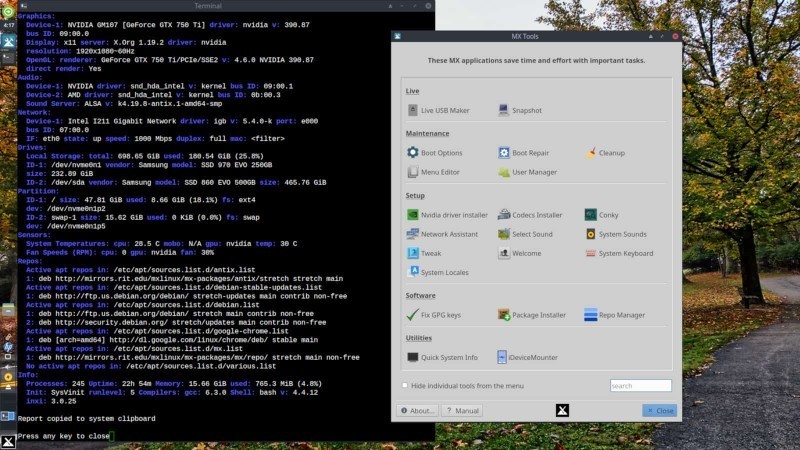
The Xfce themed desktop has an attractive background which can be effortlessly personalized according to your requirements. You can change the appearance at any time with just a click of a button. The most flexible trait of MX Linux is that it consists of advanced tools which are appropriate and easy to use for newbies. The user-friendly tools called MX tools help MX Linux to stand out from other distros. These tools allow you to amend the broken GPG keys.
A hefty collection of advanced apps are found in your desktop after installation of MX Linux, some of them are listed below:
- Email client Thunderbird v52.5
- Clementine music player
- Passwords and keys for security purpose
- VLC
- GNOME-PPP
- MX Boot Repair
- CUPS printing, cron, scanning, and sudo are other services that can be utilized by selecting them during installation.
Live USB kernel updater, snapshot, mastering, and cloning tools are some of the other useful tools that make operation and administration easygoing. The MX Linux also includes Nvidia driver and Codecs installer, Network assistant, system keyboard and many other mostly unique tools which make managing tasks a trouble-free process.
The MX’s package installers permit you to browse through distinct categories of programs and apps, while the MX’s program manager allows you to install, uninstall or upgrade programs by clicking on a simple checkbox.
You can conveniently and straightforwardly download MX Linux ISO Image in your USB or DVD drive. You can also avail assistance via video sets and full user manual which can be found online and on board. Excellent customer support can be found by visiting their troubleshoot page.
It is very difficult to find such outstanding and exclusive features in other distros, except MX Linux!

Digital Designer, blog writer and also a tech enthusiast.
He loves to write content for blogs, podcasts, design websites, logos, brochures, banners and anything that sends a message to an audience.
You can contact Daniele at the link below:


