Creating a Google Chrome Extension can seem like an impossible task to some people, but with the right guide, it becomes an exciting project. In this tutorial, we will walk through the process of building a Google Chrome extension named “Business Content Prompt Generator.” This extension is designed to help generate business-related content based on selected prompts to be used with ChatGPT (also work for Gemini).
Whether you’re aiming to craft a mission statement, develop a marketing plan, or generate interview questions, this extension has got you covered. By the end of this tutorial, you’ll have a functional extension that you can modify to suit your needs or simply use as is. The source code for this extension is available for free download, allowing you to make any changes as needed.
Table of Contents
What’s in it?
Before we start the “how to” tutorial, here is a list of titles for the prompt you will find. These are divided by category.
Here are the titles for each category:
Business
- Mission Statement
- Company Values
- Business Plan
- Market Opportunities
- SWOT Analysis
- Growth Strategies
- Executive Summary
- Business Plan Key Components
- Market Opportunity and Target Customer Segments
- Product/Service Key Elements
- Competition Analysis
- Marketing and Sales Strategies
- Operational Plan
- Financial Projections
- Team Structure and Key Hires
- Risk and Challenges
- Key Performance Indicators
- Potential Exit Strategy
- Write a Pitch Deck
- Key Steps for a Business Plan
- Target Audience
- Purpose and Benefits
- Key Financial Metrics
- Key Legal and Regulatory Considerations
- Potential Sources of Funding
Startups
- Business Ideas
- Case Study
- Steps to Start a New Business
- Useful Tips for Startups
- Business Models
- Risk Assessing
- Market Trends
- Disruptive Businesses
- Validate a Business Idea
Marketing
- Marketing Plan
- Marketing Strategies
- Persuasive Sales Pitch
- Customer Testimonial
- Increase Sales
- Email Marketing Campaign
- Press Release
- Social Media Post/Ad
- Product Review
- Social Media Post Ideas
- Write a Blog Post
- Write an Article
- Product Description
- Email to Introduce a Product
- Newsletter
- Headlines
- Landing Page
- Factsheet
- Event Email
- Ad Banner
- Product Comparison
- Article Keywords
- Free Image
Human Resources
- Job Description
- Job Application Response
- Interview Questions
- Hiring Process
- Behavioral Interview Questions
- Technical Interview Questions
- Job Promotion
- Performance Review
- Employee Achievements
- Employee Turnover
- Training Program
- Communication
- Creativity and Innovation
- Employee Wellness
- Burnout
Support
- Response to Complaint
- FAQ Section
- Response to a Customer
- Step by Step Solution
- Refund
- Explainer
- Setup
- Language
- Tips
- Compatibility
- Discount
- Alternatives
- Demo
- Trial
- Warranty
- Repair
- Upgrade
- Operating System Compatibility
- Return Policy
- Cancellation
Remember that you can edit / remove or add your own as you like. Now let’s get on with the tutorial.
How to Build Your Own Prompt Generator Google Chrome Extension
Step 1: Setting Up Your Environment
-
Create a Directory: Begin by creating a new directory on your computer where you will store all the files for your extension. You can name this directory “business-content-prompt-generator” or any name that suits your preference.
-
Download the Provided Files: Download the files provided with this tutorial (
manifest.json,index.html,script.js, andstyle.css) and save them in the directory you created.
Step 2: Understanding the Files
-
Manifest File (
manifest.json): This file contains metadata about your extension such as its name, version, description, permissions, and the files it will use. Here, it specifies the extension’s name as “Business Content Prompt Generator,” uses version 3 of the manifest, and details which icons to display.-
Below is the source code:
{
"manifest_version": 3,
"name": "Business Content Prompt Generator",
"version": "1.0",
"description": "Generates business-related content based on selected prompts.",
"action": {
"default_popup": "index.html",
"default_icon": {
"16": "/images/icon16.png",
"48": "/images/icon48.png",
"128": "/images/icon128.png"
}
},
"icons": {
"16": "/images/icon16.png",
"48": "/images/icon48.png",
"128": "/images/icon128.png"
},
"permissions": [
"activeTab"
] } -
-
HTML File (
index.html): This is the main HTML document that will be displayed when users interact with your extension. It contains a form with multiple checkboxes corresponding to different business content prompts, alongside buttons to copy or clear the generated content.-
Below is the source code:
<!DOCTYPE html>

<html>

<head>

  <title>Business Content Prompt Generator</title>

    <meta name="viewport" content="width=device-width, initial-scale=1.0">

    <link rel="stylesheet" href="style.css">

</head>

<body>
<form id="loremForm">
<details>
<summary><span style="font-size: large;">Prompts for: <em class="button2"><strong>Business</strong></em></span></summary>
<input type="checkbox" id="mission" name="content" value="Mission Statenent" onchange="generateContent()">
<label for="title">Mission Statement</label><br>
<input type="checkbox" id="company_values" name="content" value="Company Values" onchange="generateContent()">
<label for="title">Company Values</label><br>
<input type="checkbox" id="business_plan" name="content" value="Businesss Plan" onchange="generateContent()">
<label for="title">Business Plan</label><br>
<input type="checkbox" id="market_opportunities" name="content" value="Market Opportunities" onchange="generateContent()">
<label for="title">Market Opportunities</label><br>
<input type="checkbox" id="swot_analysis" name="content" value="SWOT Analysis" onchange="generateContent()">
<label for="title">SWOT Analysis</label><br>
<input type="checkbox" id="growth_strategies" name="content" value="Growth Strategies" onchange="generateContent()">
<label for="title">Growth Strategies</label><br>
<input type="checkbox" id="executive_summary" name="content" value="Executive Summary" onchange="generateContent()">
<label for="title">Executive Summary</label><br>
<input type="checkbox" id="key_components_business_plan" name="content" value="Business Plan Key Components" onchange="generateContent()">
<label for="title">Business Plan Key Components</label><br>
<input type="checkbox" id="market_opportunity_target_customer_segments" name="content" value="Market Opportunity and Target Customer Segments" onchange="generateContent()">
<label for="title">Market Opportunity and Target Customer Segments</label><br>
<input type="checkbox" id="key_elements" name="content" value="Key Elements" onchange="generateContent()">
<label for="title">Product/Service Key Elements</label><br>
<input type="checkbox" id="competition" name="content" value="competition" onchange="generateContent()">
<label for="title">Competition Analysis</label><br>
<input type="checkbox" id="marketing_sales_strategies" name="content" value="marketing_sales_strategies" onchange="generateContent()">
<label for="title">Marketing and Sales Strategies</label><br>
<input type="checkbox" id="operational_plan" name="content" value="operational_plan" onchange="generateContent()">
<label for="title">Operational Plan</label><br>
<input type="checkbox" id="financial_projections" name="content" value="financial_projections" onchange="generateContent()">
<label for="title">Financial Projections</label><br>
<input type="checkbox" id="team_structure_key_hires" name="content" value="team_structure_key_hires" onchange="generateContent()">
<label for="title">Team Structure and Key Hires</label><br>
<input type="checkbox" id="risk_challenges" name="content" value="risk_challenges" onchange="generateContent()">
<label for="title">Risk and Challenges</label><br>
<input type="checkbox" id="kpi" name="content" value="kpi" onchange="generateContent()">
<label for="title">Key Performance Indicators</label><br>
<input type="checkbox" id="exit_strategy" name="content" value="Exit Strategy" onchange="generateContent()">
<label for="title">Potential Exit Strategy</label><br>
<input type="checkbox" id="pitch_deck" name="content" value="pitch_deck" onchange="generateContent()">
<label for="title">Write a Pitch Deck</label><br>
<input type="checkbox" id="key_steps_business_plan" name="content" value="Key Steps Business Plan" onchange="generateContent()">
<label for="title">Key Steps for a Business Plan</label><br>
<input type="checkbox" id="target_audience" name="content" value="Target Audience" onchange="generateContent()">
<label for="title">Target Audience</label><br>
<input type="checkbox" id="purpose_benefits" name="content" value="Purpose and Banefits" onchange="generateContent()">
<label for="title">Purpose and Benefits</label><br>
<input type="checkbox" id="key_metrics" name="content" value="Key Financial Metrics" onchange="generateContent()">
<label for="title">Key Financial Metrics</label><br>
<input type="checkbox" id="key_legal" name="content" value="Key Legal and Regulatory Considerations" onchange="generateContent()">
<label for="title">Key Legal and Regulatory Considerations</label><br>
<input type="checkbox" id="potential_sources_funding" name="content" value="Potential Sources of Funding" onchange="generateContent()">
<label for="title">Potential Sources of Funding</label><br>
<p> </p></details>
<details>
<summary><span style="font-size: large;">Prompts for: <em class="button3"><strong>Startups</strong></em></span>
</summary>
<input type="checkbox" id="business_ideas" name="content" value="Business Ideas" onchange="generateContent()">
<label for="title">Business Ideas</label><br>
<input type="checkbox" id="case_study" name="content" value="Case Study" onchange="generateContent()">
<label for="title">Case Study</label><br>
<input type="checkbox" id="steps_to_start" name="content" value="Steps to Start" onchange="generateContent()">
<label for="title">Steps to Start a New Business</label><br>
<input type="checkbox" id="tips" name="content" value="tips" onchange="generateContent()">
<label for="title">Usefull Tips for Startups</label><br>
<input type="checkbox" id="business_models" name="content" value="Business Models" onchange="generateContent()">
<label for="title">Business Models</label><br>
<input type="checkbox" id="risk_assessing" name="content" value="Risk Assessing" onchange="generateContent()">
<label for="title">Risk Assessment</label><br>
<input type="checkbox" id="market_trends" name="content" value="Market Trends" onchange="generateContent()">
<label for="title">Market Trends</label><br>
<input type="checkbox" id="disruptive" name="content" value="Disruptive Businesses" onchange="generateContent()">
<label for="title">Disruptive Businesses</label><br>
<input type="checkbox" id="validate" name="content" value="Validate" onchange="generateContent()">
<label for="title">Validate a Business Idea</label><br><p> </p>
</details>


<details>

   <summary>
<span style="font-size: large;">Prompts for: <em class="button1"><strong>Marketing</strong></em></span>
</summary>
<input type="checkbox" id="marketing_plan" name="content" value="Marketing Plan" onchange="generateContent()">
<label for="title">Marketing Plan</label><br>
<input type="checkbox" id="marketing_strategies" name="content" value="Marketing Strategies" onchange="generateContent()">
<label for="title">Marketing Strategies</label><br>
<input type="checkbox" id="sales_pitch" name="content" value="Persuasive Sales Pitch" onchange="generateContent()">
<label for="title">Persuasive Sales Pitch</label><br>
<input type="checkbox" id="testimonial" name="content" value="Testimonial" onchange="generateContent()">
<label for="title">Customer Testimonial</label><br>
<input type="checkbox" id="increase_sales" name="content" value="Increase Sales" onchange="generateContent()">
<label for="title">Increase Sales</label><br>
<input type="checkbox" id="email_campaign" name="content" value="Email Marketing Campaign" onchange="generateContent()">
<label for="title">Email Marketing Campaign</label><br>
<input type="checkbox" id="press_release" name="content" value="Press Release" onchange="generateContent()">
<label for="title">Press Release</label><br>
<input type="checkbox" id="sm_post" name="content" value="Social Media Post" onchange="generateContent()">
<label for="title">Social media Post/Ad</label><br>
<input type="checkbox" id="product_review" name="content" value="Product Review" onchange="generateContent()">
<label for="title">Product Review</label><br>
<input type="checkbox" id="sm_post_ideas" name="content" value="Social Media Post Ideas" onchange="generateContent()">
<label for="title">Social Media Post Ideas</label><br>
<input type="checkbox" id="blog_post" name="content" value="Blog Post" onchange="generateContent()">
<label for="title">Write a Blog Post</label><br>
<input type="checkbox" id="article" name="content" value="Article" onchange="generateContent()">
<label for="title">Write an Article</label><br>
<input type="checkbox" id="product_description" name="content" value="Product Description" onchange="generateContent()">
<label for="title">Product Description</label><br>
<input type="checkbox" id="email_2_prod" name="content" value="Email to Introduce a Product" onchange="generateContent()">
<label for="title">Email to Introduce a Product</label><br>
<input type="checkbox" id="newsletter" name="content" value="Newsletter" onchange="generateContent()">
<label for="title">Newsletter</label><br>
<input type="checkbox" id="headlines" name="content" value="Headlines" onchange="generateContent()">
<label for="title">Headlines</label><br>
<input type="checkbox" id="landing_page" name="content" value="Landing Page" onchange="generateContent()">
<label for="title">Landing Page</label><br>
<input type="checkbox" id="factsheet" name="content" value="Factsheet" onchange="generateContent()">
<label for="title">Factsheet</label><br>
<input type="checkbox" id="event_email" name="content" value="Event Email" onchange="generateContent()">
<label for="title">Event Email</label><br>
<input type="checkbox" id="ad_banner" name="content" value="Ad Banner" onchange="generateContent()">
<label for="title">Ad Banner</label><br>
<input type="checkbox" id="product_comparison" name="content" value="Product Comparison" onchange="generateContent()">
<label for="title">Product Comparison</label><br><input type="checkbox" id="keywords" name="content" value="Keywords" onchange="generateContent()">
<label for="title">Article Keywords</label><br><input type="checkbox" id="pixabay" name="content" value="Free Image" onchange="generateContent()">
<label for="title">Free Image [*Gemini]</label><br><p> </p>
</details>
<details>
<summary>
<span style="font-size: large;">Prompts for: <em class="button4"><strong>Human Resources</strong></em></span>
</summary><input type="checkbox" id="job_description" name="content" value="Job Description" onchange="generateContent()">
<label for="title">Job Description</label><br>
<input type="checkbox" id="job_application_response" name="content" value="Job Application Response" onchange="generateContent()">
<label for="title">Job Application Response</label><br><input type="checkbox" id="interview_questions" name="content" value="Interview Questions" onchange="generateContent()">
<label for="title">Interview Questions</label><br><input type="checkbox" id="hiring_process" name="content" value="Hiring Process" onchange="generateContent()">
<label for="title">Hiring Process</label><br><input type="checkbox" id="behavioral_interview_questions" name="content" value="Behavioral Interview Questions" onchange="generateContent()">
<label for="title">Behavioral Interview Questions</label><br><input type="checkbox" id="technical_interview_questions" name="content" value="Technical Interview Questions" onchange="generateContent()">
<label for="title">Technical Interview Questions</label><br><input type="checkbox" id="job_promotion" name="content" value="Job Promotion" onchange="generateContent()">
<label for="title">Job Promotion</label><br><input type="checkbox" id="performance_review" name="content" value="Performance Review" onchange="generateContent()">
<label for="title">Performance Review</label><br><input type="checkbox" id="employee_achievements" name="content" value="Employee Achievements" onchange="generateContent()">
<label for="title">Employee Achievements</label><br><input type="checkbox" id="employee_turnover" name="content" value="Employee Turnover" onchange="generateContent()">
<label for="title">Employee Turnover</label><br><input type="checkbox" id="training_program" name="content" value="Training Program" onchange="generateContent()">
<label for="title">Training Program</label><br><input type="checkbox" id="communication" name="content" value="Communication" onchange="generateContent()">
<label for="title">Communication</label><br><input type="checkbox" id="creativity" name="content" value="Creativity" onchange="generateContent()">
<label for="title">Creativity and Innovation</label><br><input type="checkbox" id="wellness" name="content" value="Wellness" onchange="generateContent()">
<label for="title">Employee Wellness</label><br><input type="checkbox" id="burnout" name="content" value="Burnout" onchange="generateContent()">
<label for="title">Burnout</label><br><p> </p>
</details>
<details>
<summary>
<span style="font-size: large;">Prompts for: <em class="button5"><strong>Support</strong></em></span>
</summary><input type="checkbox" id="complaint" name="content" value="Complaint" onchange="generateContent()">
<label for="title">Response to Complaint</label><br><input type="checkbox" id="faq" name="content" value="FAQ" onchange="generateContent()">
<label for="title">FAQ Section</label><br><input type="checkbox" id="response" name="content" value="Response to Question" onchange="generateContent()">
<label for="title">Response to a Customer</label><br><input type="checkbox" id="solution" name="content" value="Solution" onchange="generateContent()">
<label for="title">Step by Step Solution</label><br><input type="checkbox" id="refund" name="content" value="Refund" onchange="generateContent()">
<label for="title">Refund</label><br><input type="checkbox" id="explainer" name="content" value="Explainer" onchange="generateContent()">
<label for="title">Explainer</label><br><input type="checkbox" id="setup" name="content" value="Setup" onchange="generateContent()">
<label for="title">Setup</label><br><input type="checkbox" id="language" name="content" value="Language" onchange="generateContent()">
<label for="title">Language</label><br><input type="checkbox" id="tips2" name="content" value="Tips" onchange="generateContent()">
<label for="title">Tips</label><br><input type="checkbox" id="compatibility" name="content" value="Compatibility" onchange="generateContent()">
<label for="title">Compatibility</label><br><input type="checkbox" id="discount" name="content" value="Discount" onchange="generateContent()">
<label for="title">Discount</label><br><input type="checkbox" id="alternatives" name="content" value="Alternatives" onchange="generateContent()">
<label for="title">Alternatives</label><br><input type="checkbox" id="demo" name="content" value="Demo" onchange="generateContent()">
<label for="title">Demo</label><br><input type="checkbox" id="trial" name="content" value="Trial" onchange="generateContent()">
<label for="title">Trial</label><br><input type="checkbox" id="warranty" name="content" value="Warranty" onchange="generateContent()">
<label for="title">Warranty</label><br><input type="checkbox" id="repair" name="content" value="Repair" onchange="generateContent()">
<label for="title">Repair</label><br><input type="checkbox" id="upgrade" name="content" value="Upgrade" onchange="generateContent()">
<label for="title">Upgrade</label><br><input type="checkbox" id="os" name="content" value="OS Compatibility" onchange="generateContent()">
<label for="title">Operating System Compatibility</label><br><input type="checkbox" id="returns" name="content" value="Return Policy" onchange="generateContent()">
<label for="title">Return Policy</label><br><input type="checkbox" id="cancellation" name="content" value="Cancellation" onchange="generateContent()">
<label for="title">Cancellation</label><br>
</details>
</form><textarea placeholder="Your Prompt..." id="output" readonly></textarea><button id="copyBtn">Copy to Clipboard</button>
<button id="clearBtn">Clear</button><script src="script.js"></script>
</body>
</html>
-
-
JavaScript File (
script.js): This script adds functionality to the checkboxes and buttons in your HTML file. It handles the generation of prompts based on selected options, copies content to the clipboard, and clears the selection.-
Below is the source code:
document.addEventListener('DOMContentLoaded', function () {

    const checkboxes = document.querySelectorAll('input[type="checkbox"]');

    checkboxes.forEach(function(checkbox) {

        checkbox.addEventListener('change', generateContent);

    });
document.getElementById('copyBtn').addEventListener('click', copyToClipboard);
document.getElementById('clearBtn').addEventListener('click', clearContent);
});function generateContent() {
const output = document.getElementById('output');
output.value = ''; // Clear previous contentconst missionCheckbox = document.getElementById('mission');
const company_valuesCheckbox = document.getElementById('company_values');
const business_planCheckbox = document.getElementById('business_plan');
const market_opportunitiesCheckbox = document.getElementById('market_opportunities');
const swot_analysisCheckbox = document.getElementById('swot_analysis');
const growth_strategiesCheckbox = document.getElementById('growth_strategies');
const executive_summaryCheckbox = document.getElementById('executive_summary');
const key_components_business_planCheckbox = document.getElementById('key_components_business_plan');
const market_opportunity_target_customer_segmentsCheckbox = document.getElementById('market_opportunity_target_customer_segments');
const key_elementsCheckbox = document.getElementById('key_elements');
const competitionCheckbox = document.getElementById('competition');
const marketing_sales_strategiesCheckbox = document.getElementById('marketing_sales_strategies');
const operational_planCheckbox = document.getElementById('operational_plan');
const financial_projectionsCheckbox = document.getElementById('financial_projections');
const team_structure_key_hiresCheckbox = document.getElementById('team_structure_key_hires');
const risk_challengesCheckbox = document.getElementById('risk_challenges');
const kpiCheckbox = document.getElementById('kpi');
const exit_strategyCheckbox = document.getElementById('exit_strategy');
const pitch_deckCheckbox = document.getElementById('pitch_deck');
const key_steps_business_planCheckbox = document.getElementById('key_steps_business_plan');
const target_audienceCheckbox = document.getElementById('target_audience');
const purpose_benefitsCheckbox = document.getElementById('purpose_benefits');
const key_metricsCheckbox = document.getElementById('key_metrics');
const key_legalCheckbox = document.getElementById('key_legal');
const potential_sources_fundingCheckbox = document.getElementById('potential_sources_funding');
const business_ideasCheckbox = document.getElementById('business_ideas');
const case_studyCheckbox = document.getElementById('case_study');
const steps_to_startCheckbox = document.getElementById('steps_to_start');
const tipsCheckbox = document.getElementById('tips');
const business_modelsCheckbox = document.getElementById('business_models');
const risk_assessingCheckbox = document.getElementById('risk_assessing');
const market_trendsCheckbox = document.getElementById('market_trends');
const disruptiveCheckbox = document.getElementById('disruptive');
const validateCheckbox = document.getElementById('validate');
const marketing_planCheckbox = document.getElementById('marketing_plan');
const marketing_strategiesCheckbox = document.getElementById('marketing_strategies');
const sales_pitchCheckbox = document.getElementById('sales_pitch');
const testimonialCheckbox = document.getElementById('testimonial');
const increase_salesCheckbox = document.getElementById('increase_sales');
const email_campaignCheckbox = document.getElementById('email_campaign');
const press_releaseCheckbox = document.getElementById('press_release');
const sm_postCheckbox = document.getElementById('sm_post');
const product_reviewCheckbox = document.getElementById('product_review');
const sm_post_ideasCheckbox = document.getElementById('sm_post_ideas');
const blog_postCheckbox = document.getElementById('blog_post');
const articleCheckbox = document.getElementById('article');
const product_descriptionCheckbox = document.getElementById('product_description');
const email_2_prodCheckbox = document.getElementById('email_2_prod');
const newsletterCheckbox = document.getElementById('newsletter');
const headlinesCheckbox = document.getElementById('headlines');
const landing_pageCheckbox = document.getElementById('landing_page');
const factsheetCheckbox = document.getElementById('factsheet');
const event_emailCheckbox = document.getElementById('event_email');
const ad_bannerCheckbox = document.getElementById('ad_banner');
const product_comparisonCheckbox = document.getElementById('product_comparison');
const job_descriptionCheckbox = document.getElementById('job_description');
const job_application_responseCheckbox = document.getElementById('job_application_response');
const interview_questionsCheckbox = document.getElementById('interview_questions');
const hiring_processCheckbox = document.getElementById('hiring_process');
const behavioral_interview_questionsCheckbox = document.getElementById('behavioral_interview_questions');
const technical_interview_questionsCheckbox = document.getElementById('technical_interview_questions');
const job_promotionCheckbox = document.getElementById('job_promotion');
const performance_reviewCheckbox = document.getElementById('performance_review');
const employee_achievementsCheckbox = document.getElementById('employee_achievements');
const employee_turnoverCheckbox = document.getElementById('employee_turnover');
const training_programCheckbox = document.getElementById('training_program');
const communicationCheckbox = document.getElementById('communication');
const creativityCheckbox = document.getElementById('creativity');
const wellnessCheckbox = document.getElementById('wellness');
const burnoutCheckbox = document.getElementById('burnout');
const complaintCheckbox = document.getElementById('complaint');
const faqCheckbox = document.getElementById('faq');
const responseCheckbox = document.getElementById('response');
const solutionCheckbox = document.getElementById('solution');
const refundCheckbox = document.getElementById('refund');
const explainerCheckbox = document.getElementById('explainer');
const setupCheckbox = document.getElementById('setup');
const languageCheckbox = document.getElementById('language');
const tips2Checkbox = document.getElementById('tips2');
const compatibilityCheckbox = document.getElementById('compatibility');
const discountCheckbox = document.getElementById('discount');
const alternativesCheckbox = document.getElementById('alternatives');
const demoCheckbox = document.getElementById('demo');
const trialCheckbox = document.getElementById('trial');
const warrantyCheckbox = document.getElementById('warranty');
const repairCheckbox = document.getElementById('repair');
const upgradeCheckbox = document.getElementById('upgrade');
const osCheckbox = document.getElementById('os');
const returnsCheckbox = document.getElementById('returns');
const cancellationCheckbox = document.getElementById('cancellation');
const keywordsCheckbox = document.getElementById('keywords');
const pixabayCheckbox = document.getElementById('pixabay');if (missionCheckbox.checked) {
output.value += 'Write a [number of words] mission statement for [company/brand].\n\n';
}
if (company_valuesCheckbox.checked) {
output.value += 'Generate a list of [number] company values for [company/brand].\n\n';
}
if (business_planCheckbox.checked) {
output.value += 'Write a [number of words] business plan for [company/brand].\n\n';
}
if (market_opportunitiesCheckbox.checked) {
output.value += 'Provide a list of [number] market opportunities for [product/service/industry].\n\n';
}
if (swot_analysisCheckbox.checked) {
output.value += 'Write a detailed SWOT analysis for [company/brand/product/service].\n\n';
}
if (growth_strategiesCheckbox.checked) {
output.value += 'Generate a list of [number] growth strategies for [company/brand/product/.\n\n';
}
if (executive_summaryCheckbox.checked) {
output.value += 'Write an executive summary for a [industry/business type] business plan.\n\n';
}
if (key_components_business_planCheckbox.checked) {
output.value += 'Outline the key components of a business plan for a [industry/business type] business.\n\n';
}
if (market_opportunity_target_customer_segmentsCheckbox.checked) {
output.value += 'Define the market opportunity and target customer segments for a [industry/business type] business.\n\n';
}
if (key_elementsCheckbox.checked) {
output.value += 'Outline the key elements of the product/service offering for a [industry/business type] business.\n\n';
}
if (competitionCheckbox.checked) {
output.value += 'Describe the competition in the [industry/business type] market and how the business differentiates itself.\n\n';
}
if (marketing_sales_strategiesCheckbox.checked) {
output.value += 'Outline the marketing and sales strategies for a [industry/business type] business.\n\n';
}
if (operational_planCheckbox.checked) {
output.value += 'Explain the operational plan for a [industry/business type] business, including the production process and logistics.\n\n';
}
if (financial_projectionsCheckbox.checked) {
output.value += 'Detail the financial projections for a [industry/business type] business, including revenue and expenses.\n\n';
}
if (team_structure_key_hiresCheckbox.checked) {
output.value += 'Outline the team structure and key hires for a [industry/business type] business.\n\n';
}
if (risk_challengesCheckbox.checked) {
output.value += 'Discuss the risks and challenges for a [industry/business type] business and how they will be mitigated.\n\n';
}
if (kpiCheckbox.checked) {
output.value += 'Outline the key performance indicators (KPIs) for a [industry/business type] business.\n\n';
}
if (exit_strategyCheckbox.checked) {
output.value += 'Discuss the potential exit strategy for a [industry/business type] business.\n\n';
}
if (pitch_deckCheckbox.checked) {
output.value += 'Write a pitch deck summarizing the key elements of a [industry/business type] business plan.\n\n';
}
if (key_steps_business_planCheckbox.checked) {
output.value += 'Outline the key steps in creating a [industry/business type] business plan.\n\n';
}
if (target_audienceCheckbox.checked) {
output.value += 'Discuss the target audience for a [industry/business type] business plan.\n\n';
}
if (purpose_benefitsCheckbox.checked) {
output.value += 'Explain the purpose and benefits of a [industry/business type] business plan.\n\n';
}
if (key_metricsCheckbox.checked) {
output.value += 'Detail the key financial metrics for a [industry/business type] business, such as profit margins, return on investment (ROI), and burn rate.\n\n';
}
if (key_legalCheckbox.checked) {
output.value += 'Outline the key legal and regulatory considerations for a [industry/business type] business.\n\n';
}
if (potential_sources_fundingCheckbox.checked) {
output.value += 'Discuss the potential sources of funding for a [industry/business type] business, such as venture capital, angel investors, and crowdfunding.\n\n';
}
if (business_ideasCheckbox.checked) {
output.value += 'Generate [number] ideas for starting a new business in [industry].\n\n';
}
if (case_studyCheckbox.checked) {
output.value += 'Provide [number] examples of successful businesses in [industry] and write for each a summarized case study.\n\n';
}
if (steps_to_startCheckbox.checked) {
output.value += 'Outline the steps to starting a new business in [industry].\n\n';
}
if (tipsCheckbox.checked) {
output.value += 'Give [number] tips for successfully starting a business in [industry].\n\n';
}
if (business_modelsCheckbox.checked) {
output.value += 'Provide [number] examples of innovative business models in [industry].\n\n';
}
if (risk_assessingCheckbox.checked) {
output.value += 'Outline the risks and challenges of starting a business in [industry].\n\n';
}
if (market_trendsCheckbox.checked) {
output.value += 'Identify [number] market trends in [industry].\n\n';
}
if (disruptiveCheckbox.checked) {
output.value += 'Provide [number] examples of businesses that have disrupted [industry].\n\n';
}
if (validateCheckbox.checked) {
output.value += 'Outline the steps to validate a business idea.\n\n';
}
if (marketing_planCheckbox.checked) {
output.value += 'Write a [number of words] marketing plan for [product/service].\n\n';
}
if (marketing_strategiesCheckbox.checked) {
output.value += 'Provide a list of [number] marketing strategies for [product/service].\n\n';
}
if (sales_pitchCheckbox.checked) {
output.value += 'Write a persuasive [number of words] sales pitch for [product/service].\n\n';
}
if (testimonialCheckbox.checked) {
output.value += 'Write a [number of words] customer testimonial for [product/service].\n\n';
}
if (increase_salesCheckbox.checked) {
output.value += 'Generate a list of [number] ways to increase [product/service] sales.\n\n';
}
if (email_campaignCheckbox.checked) {
output.value += 'Write a [number of words] email marketing campaign for [product/service].\n\n';
}
if (press_releaseCheckbox.checked) {
output.value += 'Write a [number of words] press release for [company/product/event].\n\n';
}
if (sm_postCheckbox.checked) {
output.value += 'Create [number of] social media ads for [product/service].\n\n';
}
if (product_reviewCheckbox.checked) {
output.value += 'Write a [number of words] product review for [product/service].\n\n';
}
if (sm_post_ideasCheckbox.checked) {
output.value += 'Generate [number of] ideas for a [social media platform] post on [topic/industry].\n\n';
}
if (blog_postCheckbox.checked) {
output.value += 'Write a [number of words] blog post on [topic].\n\n';
}
if (articleCheckbox.checked) {
output.value += 'Write a [number of words] article about [topic/trend] in [industry]. Use a [tone] and a [style] to [target audience]. Add 5 FAQ at the end. Write in [language]. \n\n';
}
if (product_descriptionCheckbox.checked) {
output.value += 'Write a [number of words] description for a [product/service]. \n\n';
}
if (email_2_prodCheckbox.checked) {
output.value += 'Write a [number of words] email to introduce a [product/service] to [target audience]. \n\n';
}
if (newsletterCheckbox.checked) {
output.value += 'Write a [number of words] newsletter about [topic/event/update]. \n\n';
}
if (headlinesCheckbox.checked) {
output.value += 'Generate [number of] headlines for a [blog post/article/newsletter/social media post] on [topic]. \n\n';
}
if (landing_pageCheckbox.checked) {
output.value += 'Create website copy about [product details]. Follow the following structure {Hero | Subheader| Call to action | Tagline | H2 | paragraph | H2 | paragraph | H2 | paragraph | Call to action | Contact Details}. \n\n';
}
if (factsheetCheckbox.checked) {
output.value += 'Write a factsheet about [topic or URL] for [specific audience]. \n\n';
}
if (event_emailCheckbox.checked) {
output.value += 'Here is the landing page link for an upcoming event we are hosting: [URL]. Write the following emails to support this event: 1. pre-event: invitation | 2. post-sign-up: thank you for registering | 3. pre-event: reminder event begins in one hour | 4. post-event: thanks for attending, share recording. \n\n';
}
if (ad_bannerCheckbox.checked) {
output.value += 'Write [number of sentences] of copy for an [ad/banner] promoting [product/service]. \n\n';
}
if (job_descriptionCheckbox.checked) {
output.value += 'Write a job description for a [position] role. \n\n';
}
if (job_application_responseCheckbox.checked) {
output.value += 'Write a [number of words] response to a candidate who has applied for the [job title] position. \n\n';
}
if (interview_questionsCheckbox.checked) {
output.value += 'Provide a list of [number] interview questions for a [job title]. \n\n';
}
if (hiring_processCheckbox.checked) {
output.value += 'Explain the steps in the [company] hiring process. \n\n';
}
if (behavioral_interview_questionsCheckbox.checked) {
output.value += 'Write a list of [number] behavioral interview questions for a [position] role. \n\n';
}
if (technical_interview_questionsCheckbox.checked) {
output.value += 'Write a list of [number] technical interview questions for a [position] role. \n\n';
}
if (job_promotionCheckbox.checked) {
output.value += 'Write a list of [number] job promotion criteria for a [position] role. \n\n';
}
if (performance_reviewCheckbox.checked) {
output.value += 'Write a list of [number] tips for conducting a successful performance review. \n\n';
}
if (employee_achievementsCheckbox.checked) {
output.value += 'Write a list of [number] ways to recognize and reward employee achievements. \n\n';
}
if (employee_turnoverCheckbox.checked) {
output.value += 'Write a list of [number] ways to handle employee turnover. \n\n';
}
if (training_programCheckbox.checked) {
output.value += 'Write a list of [number] ways to develop and implement an effective training program. \n\n';
}
if (communicationCheckbox.checked) {
output.value += 'Write a list of [number] ways to improve communication in the workplace. \n\n';
}
if (creativityCheckbox.checked) {
output.value += 'Write a list of [number] ways to encourage employee creativity and innovation. \n\n';
}
if (wellnessCheckbox.checked) {
output.value += 'Write a list of [number] ways to support employee wellness and mental health in the work environment. \n\n';
}
if (burnoutCheckbox.checked) {
output.value += 'Write a list of [number] ways to handle employee burnout. \n\n';
}
if (complaintCheckbox.checked) {
output.value += 'Write a response to a customer complaint about [product/service]. \n\n';
}
if (faqCheckbox.checked) {
output.value += 'Create a FAQ section for [product/service]. \n\n';
}
if (responseCheckbox.checked) {
output.value += 'Write a [number of words] response to a customer question about [product/service feature]. \n\n';
}
if (solutionCheckbox.checked) {
output.value += 'Provide a step-by-step solution for [problem]. \n\n';
}
if (refundCheckbox.checked) {
output.value += 'Write a response to a customer who is requesting a refund for [product/service]. \n\n';
}
if (explainerCheckbox.checked) {
output.value += 'Explain [feature/benefit] of [product/service] in simple terms. \n\n';
}
if (setupCheckbox.checked) {
output.value += 'Write a response to a customer who is having trouble setting up [product/service]. \n\n';
}
if (languageCheckbox.checked) {
output.value += 'Write a response to a customer who is asking for support in [language]. \n\n';
}
if (tips2Checkbox.checked) {
output.value += 'Provide a list of [number] tips to troubleshoot [problem]. \n\n';
}
if (compatibilityCheckbox.checked) {
output.value += 'Write a response to a customer who is asking for compatibility with [device/software]. \n\n';
}
if (discountCheckbox.checked) {
output.value += 'Write a response to a customer who is asking for a discount on [product/service]. \n\n';
}
if (alternativesCheckbox.checked) {
output.value += 'Provide a list of [number] alternatives to [product/service]. \n\n';
}
if (demoCheckbox.checked) {
output.value += 'Write a response to a customer who is asking for a demo of [product/service]. \n\n';
}
if (trialCheckbox.checked) {
output.value += 'Write a response to a customer who is asking for a trial of [product/service]. \n\n';
}
if (warrantyCheckbox.checked) {
output.value += 'Explain in simple words the warranty terms for [product/service] that you can view at [URL]. \n\n';
}
if (repairCheckbox.checked) {
output.value += 'Write a response to a customer who is asking for a [repair/ammend] for [product/service] with [positive / negative] result. \n\n';
}
if (upgradeCheckbox.checked) {
output.value += 'Provide a list of [number] steps to upgrade [product/service] referring to this [tutorial /URL]. \n\n';
}
if (osCheckbox.checked) {
output.value += 'Write a response to a customer who is asking for compatibility with [operating system] by taking the info from [tutorial/URL]. \n\n';
}
if (returnsCheckbox.checked) {
output.value += 'Explain the return policy for [product/service] taking the info from this [tutorial/URL]. \n\n';
}
if (cancellationCheckbox.checked) {
output.value += 'Write a [positive/negative] response to a customer who is looking to cancel their [product/service] subscription. \n\n';
}
if (keywordsCheckbox.checked) {
output.value += 'Find 10 appropriate keywords for [article title]. \n\n';
}
if (pixabayCheckbox.checked) {
output.value += 'Suggest a pertinent picture from pixabay.com with the selected [keyword]. \n\n';
}
}function copyToClipboard() {
const output = document.getElementById('output');
output.select();
document.execCommand('copy');
}function clearContent() {
const output = document.getElementById('output');
output.value = '';
const checkboxes = document.querySelectorAll('input[type=checkbox]');
checkboxes.forEach(checkbox => checkbox.checked = false);
}
-
-
CSS File (
style.css): This stylesheet file is used to style the HTML content of your extension, making it visually appealing. Since it’s not directly provided here, you can create a simplestyle.cssfile to add basic styling to your form and textarea.-
Below is the source code:
body {

    font-family: Arial, sans-serif;

    padding: 5px;

    width: 400px; /* Adjust the width as needed */

}
#output {
width: 100%;
height: 100px;
margin-top: 10px;
}button {
background-color: #04AA6D; /* Green */
border: none;
color: white;
padding: 8px 16px;
text-align: center;
text-decoration: none;
display: inline-block;
font-size: 16px;
}form {
margin-bottom: 10px;
}textarea {
width: 100%;
height: 150px;
padding: 12px 20px;
box-sizing: border-box;
border: 2px solid #ccc;
border-radius: 4px;
background-color: #f8f8f8;
font-size: 16px;
resize: none;
}.button1 {
background-color: red;
color: white;
border: 2px solid white; /* Marketing */
padding: 2px;
box-shadow: 0 4px 4px 0 rgba(0,0,0,0.2), 0 6px 6px 0 rgba(0,0,0,0.14);
}.button2 {
background-color: green;
color: white;
border: 2px solid white; /* Business */
padding: 2px;
box-shadow: 0 4px 4px 0 rgba(0,0,0,0.2), 0 6px 6px 0 rgba(0,0,0,0.14);
}.button3 {
background-color: blue;
color: white;
border: 2px solid white; /* Startups */
padding: 2px;
box-shadow: 0 4px 4px 0 rgba(0,0,0,0.2), 0 6px 6px 0 rgba(0,0,0,0.14);
}.button4 {
background-color: yellow;
color: black;
border: 2px solid white; /* HR */
padding: 2px;
box-shadow: 0 4px 4px 0 rgba(0,0,0,0.2), 0 6px 6px 0 rgba(0,0,0,0.14);
}.button5 {
background-color: teal;
color: white;
border: 2px solid white; /* SUPPORT */
padding: 2px;
box-shadow: 0 4px 4px 0 rgba(0,0,0,0.2), 0 6px 6px 0 rgba(0,0,0,0.14);
}
}
-
Step 3: Creating the Extension
-
Write the Manifest: Ensure your
manifest.jsonfile contains the correct structure and paths to your HTML, JS, and CSS files. You need to specify the “manifest_version”, “name”, “version”, “description”, “permissions”, and the paths to icons. -
Design the UI: In
index.html, structure your user interface. Use the provided HTML structure as a guide to include checkboxes for different content prompts and buttons for copying and clearing content. -
Add Functionality: Use the
script.jsfile to add interactivity to your extension. Implement functions to generate content based on checked options, copy this content to the clipboard, and clear selections. -
Style Your Extension: Use the
style.cssfile to style your UI. This can include setting font sizes, margins, padding, and other styling properties to make your extension visually appealing.
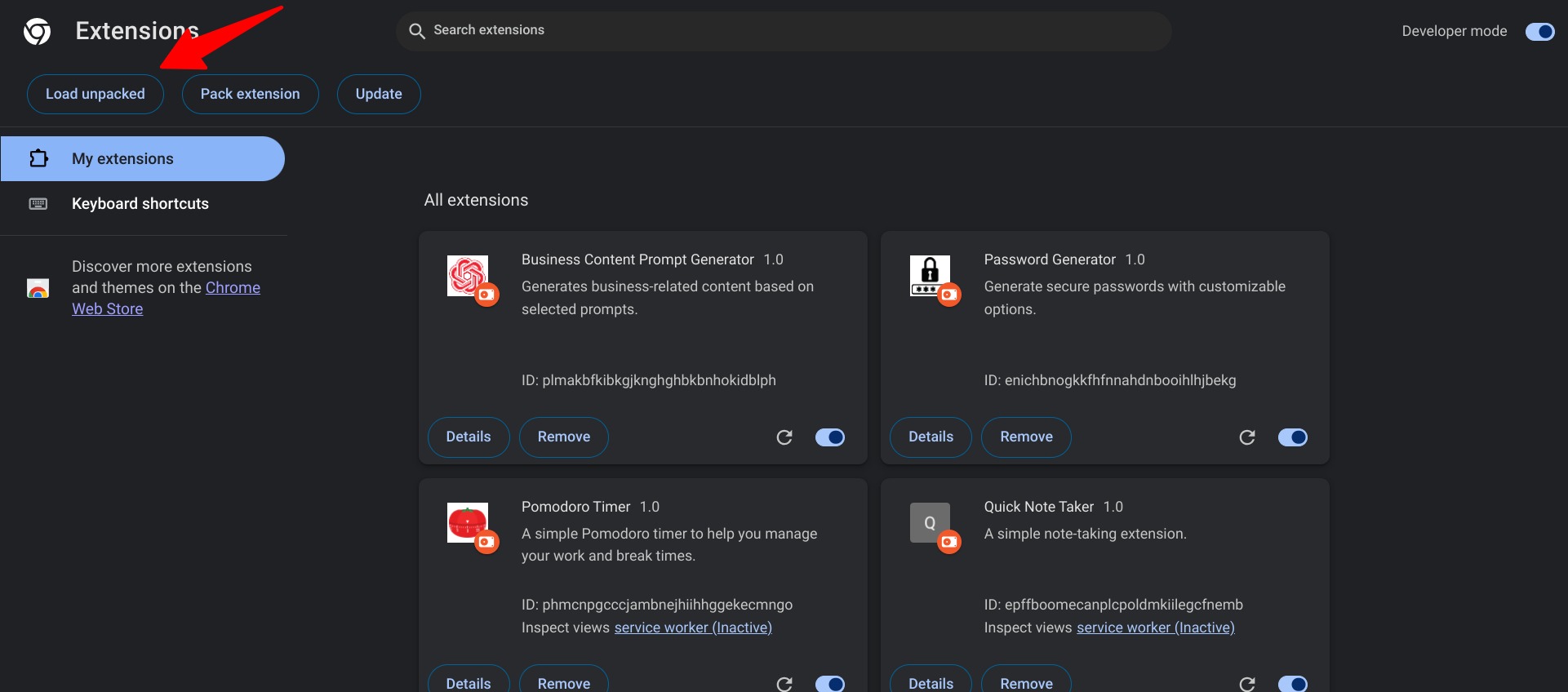
Step 4: Loading Your Extension into Chrome
-
Open Chrome Extensions Page: Navigate to
chrome://extensions/in your Google Chrome browser. -
Enable Developer Mode: Turn on the “Developer mode” toggle in the top-right corner of the extensions page.
-
Load Unpacked Extension: Click on the “Load unpacked” button and select the directory containing your extension’s files. Your extension should now appear in the list of installed extensions and is ready to use.

Step 5: Using Your Extension
- Click on the extension icon in your browser toolbar to open the “Business Content Prompt Generator.”
- Select the checkboxes corresponding to the content prompts you’re interested in generating.
- Click the “Copy to Clipboard” button to copy the generated prompts.
- Use the “Clear” button to deselect all options and start over.

Conclusion
Congratulations! You’ve successfully built and installed your very own Google Chrome extension. This step-by-step guide has shown you how to set up the extension environment, understand the purpose of each file, and implement the necessary functionality. You can now explore further by adding more features, refining the UI, or even creating new extensions using the skills you’ve acquired.
Important Note for Readers:
In addition to the manifest.json, index.html, script.js, and style.css files provided for the “Business Content Prompt Generator” extension, please note that the download ZIP file also includes an images folder. This folder contains all the necessary icons used by the extension, as specified in the manifest.json file. Ensure you include this folder in your project directory when setting up your environment and loading the extension into Chrome. This step is crucial for displaying the extension’s icons correctly in the browser toolbar and extension management page.
Additional note on Publishing to the Google Chrome Web Store:
While the primary focus of this tutorial is to guide you through building and loading your “Business Content Prompt Generator” extension locally, it’s worth noting that you have the option to share your creation with a wider audience. Once you’re satisfied with your extension and have tested it thoroughly, you can consider publishing it to the Google Chrome Web Store.
Publishing to the Chrome Web Store involves a few additional steps, including creating a developer account, paying a one-time registration fee, packaging your extension properly, and submitting it for review. This process allows you to reach millions of Chrome users and provide them with easy access to your extension. For more detailed instructions on how to publish your extension, please refer to the official Chrome Developers documentation on “Publishing Your Extension.” Remember, this step is optional and entirely up to you if you wish to share your extension beyond personal or internal use.

Digital Designer, blog writer and also a tech enthusiast.
He loves to write content for blogs, podcasts, design websites, logos, brochures, banners and anything that sends a message to an audience.
You can contact Daniele at the link below: