
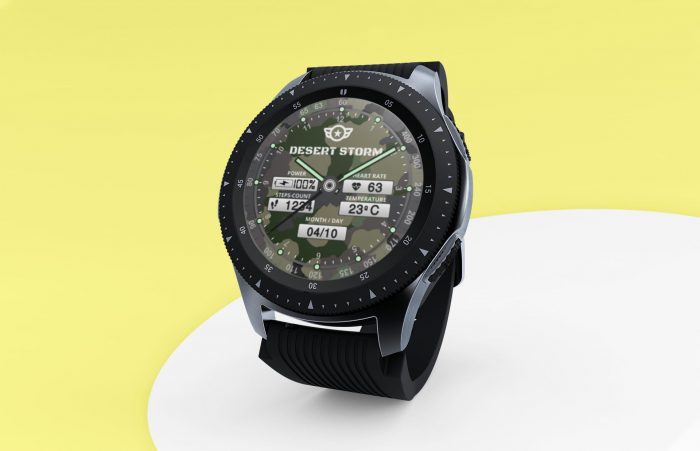

This the second watch face design of our mini series, if you are new to this blog and you want to check the previous one you can follow this link here.
First of all, for those of you who own any of the watches below mentioned, great news, this is not only a “design”, but comes in a zip archive with all the xml and other files so that if you know the “how to’s” you can install it onto your watch in a minute. The design is for a round watch of 400×400 so it can be installed in a large amount of watches. Here is a list of compatible watches:
AllCall W2, BAKEEY A4, Bakeey i3, CACGO K98H, DIGGRO DI01, DM368, FINOW X7. i4 Air, kingwear KC05, Kospet Hope, KW68, Lemfo LEM 8. LEMFO LEM5 Pro, LEMFO LEM7, LEMFO LEM9, LEMFO LEMX, LEMFO LES 1. LEMFO LF25, LEMFO Smart Watch, LEM8 4G LTE Smart, LF17 Smart Watch. LIU551, LOKMAT LOK02, Microwear H2, MTK6580, Ourtime X200. S1 3G, TEEPAO Kospet Hope, X200, Y5 , Zeblaze THOR 4, Zeblaze Thor 4 Pro, Zeblaze THOR PRO 3G, ZGPAX S99A 3. There might be some more so if you have round Android Smartwach chances are that it will work for you.
The watch face has the following functional features:
- Analog time ”hour,min”
- Heart rate
- Steps counter
- Temperature
- Battery percent
- Date “day,month”
This watch design is for those passionate of military style and has a camouflage background with tones of green and brown as per soil, grass, plants, trees and nature in general. As you would expect in a “mission watch” all your important data is quickly available at first glance. Despite the rough use you might want to do with a military watch, this design is humble and minimalist so that it can be wear by anyone.
As mentioned already all the files are included in the zip, so for you, if you have already messed with watch faces on an Android watches, it will be really a matter of a minute to have it installed.
As a bonus, you can find in the archive a copy of the open source software I have used for the design (WatchFaceDesigner.jar) so if you like … why not design your own watch faces?
Here is how to install this watch face in a few steps:
- extract the downloaded zip archive in a folder in your PC
- create A “clockskin” folder on your watch (if you don’t already have it)
- copy extracted file to your watch in the “clockskin” Folder
- refresh your watch faces
That’s it, good luck and enjoy
Alternatively, have a look at this video on YouTube for yet another way to install your own designed watch faces; https://youtu.be/8-YBmatCbgE
I would like to thank all the Android community and people like Marco Ferreira for giving away free the design software and allowing all of us to have fun designing all sort of watch faces. So what’s is going to be you first or next watch face?

Digital Designer, blog writer and also a tech enthusiast.
He loves to write content for blogs, podcasts, design websites, logos, brochures, banners and anything that sends a message to an audience.
You can contact Daniele at the link below:


